1
4-2
DHCP Configuration
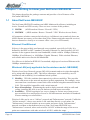
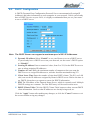
A DHCP (Dynamic Host Configuration Protocol) Server can automatically assign IP
Addresses and other information to each computer in your network. Unless you already
have a DHCP Service on your LAN, it is highly recommended that you set your router
to act as a DHCP server.
Note: The DHCP Server can support a maximum pool of 253 IP Addresses.
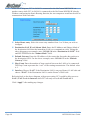
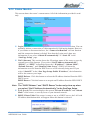
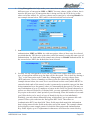
■ Dynamic IP Address Select “Enable” to set your Router to act as a DHCP server.
If you already have a DHCP server on your network, set the router’s DHCP option
to “Disable”.
■ Starting IP Address Enter a numerical value, from 2 to 254, for the DHCP server to
start at when assigning IP Addresses.
■ Number of Users Enter the maximum number of computers that you want the
DHCP server to assign IP Addresses to, with the absolute maximum being 253.
■ Client Lease Time Enter the number of time that DHCP clients (The PCs on LAN
side) can use the IP Addresses assigned by Router's DHCP server. Before the time is
up, DHCP clients have to request to renew the DHCP information.
■ DNS The IP Address of the Domain Name Server, which is currently used. Multiple
DNS IP settings are common. The first DNS entry will be used in most cases.
■ DHCP Clients Table Click the DHCP Clients Table button to show current DHCP
client information. Such as what IP addresses are already being used, etc.
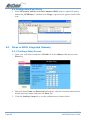
Click the "Apply" button after making any changes, or click the "Cancel" button to exit
the screen without saving any changes.
Rev.1 - YML686
NB5580/W User Guide
www.netcomm.com.au
Page 29