1
Section 5
Communication Ports Wiring
Overview
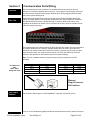
The EL326 switches provide connections to standard Ethernet devices such as PLCs,
Ethernet I/O, industrial computers and much more. Three types of communication ports may
be found on these switches: RJ45 (copper) Ethernet ports, SFP (pluggable) Ethernet ports
and console (serial RS232) ports.
Gig RJ45
Ports 1-24
The EL326 has 24 Gigabit RJ45 copper ports that accept 10/100/1000 Mbps twisted pair
cabling. Use data-quality (not voice-quality) twisted pair cable rated category 5E (or better)
with standard RJ45 connectors. Straight through or crossover RJ45 cable can be used
regardless of the device the switch is to be connected to as all the ports are capable of automdi/mdix-crossover detection.
The RJ45 Ethernet port connector bodies on these products are metallic and are connected to
the Chassis GND terminal. Therefore, shielded cables should be used to provide further
protection from electrical noise and interference. Ideally, to prevent ground loops, the cable
shield should be tied to the metal connector body at one end of the cable only. Electrical
isolation is also provided on the Ethernet ports for increased reliability.
Note: The use of shielded cables is required to fully meet the requirements of EMC
standards.
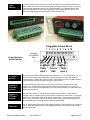
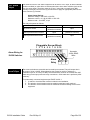
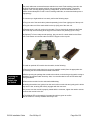
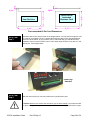
Straight-thru Cable Wiring
Pin 1
Pin 1
Pin 2
Pin 2
Pin 3
Pin 3
Pin 6
Pin 6
For Reference
Only.
Either cable
wiring will work!
Cross-over Cable Wiring
Pin 1
Pin 3
Pin 2
Pin 6
Pin 3
Pin 1
Pin 6
Pin 2
Ethernet
Plug & Connector
Pin Positions
RJ45 Cable
Distance
Gig SFP
The maximum cable length for 10/100/1000BaseT is typically 100 meters (328 ft.).
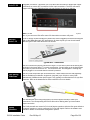
Ports 21-24 are combination gigabit ports that provide both RJ45 and SFP (Small Form-factor
EL326 Installation Guide
Rev 26-Sep-13
Page 21 of 32