1
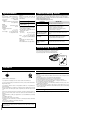
Sequential Play
Basic Play
Increase
5
4
VOL
VOL
C S-XBS TRAIN
ALL1 M
RANDOM
SORRY
VOL
Track number in play
Decrease
VOL
1
OP
C S-XBS TRAIN
R
ALL1 M
RANDOM
SORRY
OF
F
Elapsed playing time of each track
OPEN
Label must face upward.
Plug type:
3.5 mm (1/8 in.) stereo
3
HOLD
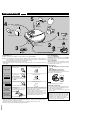
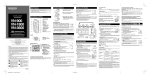
In step 2: Connect the stereo headphones to the headphone jack [Ë].(Plug in firmly.)
In step 5: The volume range is 0-25. Press and hold to change the volume successively. The volume changes when
pressed while the level is displayed. If any other display is shown, it changes to show the current level.
(The volume returns to 10 when you disconnect the power source.)
≥Play stops automatically when all the tracks have been played.
≥If the unit has been connected to the car audio system, set this unit’s volume to 10, then adjust the volume level
on the system.
Button
Display/reference
Press again to restart play.
Press during play.
To pause play
VOL
C S-XBS TRAIN
ALL1 M
RANDOM
Press during play.
FF
Play starts from the beginning of
the current track the next time you
press [1;].
Removing discs
1
2
3
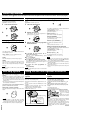
Press [∫, OPR OFF] to stop play and disc
rotation.
Slide [OPEN 1] to open the lid.
Press [PUSH] to release the disc.
Do not stop the disc by hand or try to remove it before it
stops rotating. This can damage CDs.
OPR
O
Total playing time
FF
Press during play.
(Press [:] twice to skip to the
beginning of the previous tracks.)
Backward
Forward
Press and hold during play.
PUS
ALL1 M
RANDOM
C S-XBS TRAIN
ALL1 M
RANDOM
≥During program play (page 4), these buttons are
used to skip forward or backward through the
programmed sequence of tracks.
≥You cannot skip to tracks that have been played
in random or random repeat play (page 4).
≥During program play, 1-track repeat play, random
play and random repeat play (page 4), search operation is limited to the current track only.
Resume function notes
≥Opening the lid while in the stop mode or replacing the disc while in the off mode cancels the function. (It may remain active if you replace a disc in the off mode.)
≥Play may resume from the beginning of the next track if you stopped play near the end of a track.
≥The resume function works automatically and cannot be turned off.
3
This indication appears for about 10 minutes when the
cover is opened. (However, the indication does not appear when the unit is powered off.)
VOL
VOL
The resume function remains active.
Rapid forward/
backward
(search function)
“*” indication
C S-XBS TRAIN
No indicator is shown.
Press during stop mode.
Skip forward/
backward
(skip function)
This indication appears for about 30 seconds if [1;] is
pressed when no disc is loaded in the unit or if the disc
is not properly secured.
H
O
Resume function
To turn off the
unit Off mode
For your reference:
“)” indication
PUSH
Stop mode
L
Total number of tracks
OPR
To stop play
Close the lid.
R
Follow steps 1–5.
Operation
2
Note!
Never insert foreign objects into the unit.
Auto power off function
If the unit is left in stop mode for approximately 10 minutes, the unit powers itself off automatically in order to
prevent the battery from running down.
(If no disc is loaded in the unit, it powers itself off in
about 30 seconds.)
Note on CD-R and CD-RW
This unit can play CD-DA format audio CD-R and
CD-RW that have been finalized§ upon completion
of recording. It may not be able to play some CD-R
or CD-RW due to the condition of the recording.
§Finalizing is a process that enables CD-R/CD-RW
players to play audio CD-R and CD-RW.