1
Digitizer User Manual Version 2.1
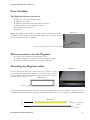
Parts Checklist
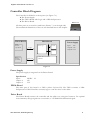
The Digitizer System consists of:
●
●
●
●
●
●
Digitizer 3x1 Series digitizing tablet
Digitizer-Controller
Digitizer-Interface-Cable with 44-pin connector
Host interface cable with 9-pin connector
Cordless Pointing Device
Charger
Note: The Digitizer-Controller is a small enclosure and attached via the
Digitizer-Interface-Cable to the back of the tablet. The controller contains
the electronics that drive the Digitizer.
Picture 1-1
Connect the Digitizer-Interface-Cable here
What you need to use the Digitizer
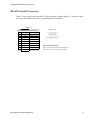
● A Host with an RS232 Communication port
● Graphic application software that accepts digitizer input
● Optional a Vacuum-System at the back of the tablet
Mounting the Digitizer tablet
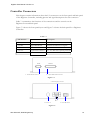
Picture 3-1
You can mount the tablet on a stable Al-Frame (s. Picture 3-1). Be
sure that the mounting-frame builds not an electrical closed frame,
because that decrease the magnetic field produced by the wires inside the tablet (s. Picture 3-2).
Picture 3-2
Isolation
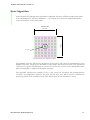
The minimum distance between the table and an extra illumination device is 500mm (s. Picture 3-3). Use
an illumination device with low electrical and magnetic field emission, for example an LED-Illumination.
500 mm
Picture 3-3
Illumination
Device
Tablet
t&m elektronik, bielefeld-germany
2