1
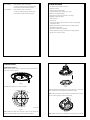
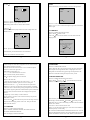
bracket in Figure 5 and by turning the Camera Platform horizontally.
3.2 Handling Precautions
1. Never let liquid of any kind flow into this unit.
2. Do not directly touch the CCD element. If it is necessary to clean the element,
use a soft cloth moistened with alcohol to wipe off the dust.
3. If any abnormality occurs, make sure to unplug the unit and contact your
local dealer.
4. This camera possesses AGC circuit. Therefore, when the camera is used
under lower luminance, the sensitivity will strengthen automatically and
make the image very rough in vision. It is normal.
Figure 5
5. When the camera is used in ATW mode, due to the working principle of
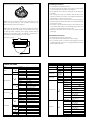
STEP 5: Then you can adjust the parameters in the OSD menu to set the
automatic tracking white balance, the recorded color is slightly different from
desired video quality according to your surveillance requirements. The
detailed instructions are specified in Chapter IV.
the real color. It is normal.
6. If the subject is with high luminance (like lamp), vertical stripes will occur
on the monitor (tailing shadow) or the surrounding image becomes vague
STEP 6: Place the Dome bubble over the Camera and tighten it by turning it
to the right. In this process, the shielding cover may block the camera. User
(flowering). It is special phenomenon of CCD, not error.
7. The power for this camera is 12VDC or 24VAC. Also, it supports centralized
can adjust the position of shielding cover by turning the bubble. With the
power supply.
shielding cover at the proper position, the installation is finished. (Note: if
2.8mm fixed lens is built-in, the shielding cover is not utilized.)
3.3 Installation Precautions
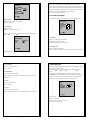
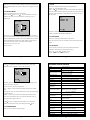
Dimensions: (Unit: mm)
1. Do not drop the unit or subject it to strong knock.
2. Do not point the camera lens toward the sun or other strong light.
3. Do not install the camera in environment with temperature beyond the
acceptable range (from -10°C to 50°C), or with high humidity, direct rainfall,
frequent vibrations and shocks.
Figure 6
6
7
Menu
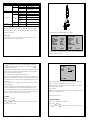
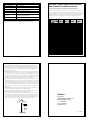
4. MENU SETTINGS
Menu
LENS
AUTO
Submenu
TYPE
MODE
SPEED
DC, VIDEO
AUTO/OPEN/CLOSE
000~255
MANUAL
AUTO
SHUTTER/AGC
MANUAL
PICT ADJUST
ATW
WHITE BAL
Submenu
PUSH LOCK
HIGH LUMINANCE
AUTO IRIS / SHUT+AUTO
MODE
IRIS
BRIGHTNESS 000~255
LOW LUMINANCE
MODE
AGC/ OFF
BRIGHTNESS ×0.25, ×0.50, ×0.75, ×1.00
MODE
SHUT +AGC
PAL: 1/50~1/100,000;
SHUT
NTSC: 1/60~1/100,000
AGC
0.00~42.00 (8-level)
MIRROR
OFF/ON
BRIGHTNESS 000~255 (Default: 000)
CONTRAST
000~255 (Default: 128)
SHARPNESS
000~255 (Default: 048)
HUE
000~255 (Default: 128)
GAIN
000~255 (Default: 128)
SPEED
000~255
DELAY CNT
000~255
ATW FRAME
×0.50~×2.00 (4-level)
ENVIRONMEN
INDOOR/OUTDOOR
T
NR
CAMERA ID
LANGUAGE
BACKLIGHT
MOTION DET
NR MODE
OFF
BLC
HLC
OFF
DETECT
SENSE
BLOCK DISP
MONITOR
AREA
AREA SEL
ON
USER 1
USER 2
ANTI-CR
MANUAL
LEVEL
8
000~255
000~255
000~255
000~255
TOP
BOTTOM
LEFT
RIGHT
AREA SEL
TOP
BOTTOM
PUSH
B-GAIN
R-GAIN
B-GAIN
R-GAIN
PRIVACY
Y/C, OFF, Y, C
ON
OFF
CHINESE/
ENGLISH/
JAPANESE
ON
LEFT
RIGHT
COLOR
TRANSP
MOSAIC
9
000~127
OFF/ON/ENABLE
OFF/ON
1/4~4/4
PAL: 000~288;
NTSC: 000~244
PAL: 000~288;
NTSC: 000~244
PAL: 000~468;
NTSC: 000~474
PAL: 000~468;
NTSC: 000~474
1/4~4/4
PAL: 000~288;
NTSC: 000~244
PAL: 000~288;
NTSC: 000~244
PAL: 000~468;
NTSC: 000~474
PAL: 000~468;
NTSC: 000~474
1~8
0.00-1.00 (4-level)
OFF/ON