1
USER SETTINGS
Remember – zone bypassing compromises security!
Note: Zones will be bypassed throughout one
disarm-arm period only. Disarming the system after
arming will suspend the entire bypassing scheme.
B. Bypassing Procedure
For PowerMaxExpress with partition feature, you
may set the bypass option according to the type of
partition access permission.
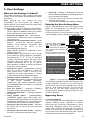
Having entered your user code successfully (see above
- Entering the User Settings Menu), the display will read:
SET BYPASS
I OK , the number and state of
If at this point you click
the first zone / partition containing the first zone (in
PowerMaxExpress with partition feature) will be
automatically displayed. Three states are then made
possible:
• Open: The zone is not secured - you can
bypass the zone if you do not wish or know how
to solve the problem right away.
• Bypassed: The zone is presently bypassed
(you bypassed it before but have not armed the
system yet).
• Functional: If there is nothing wrong with the
zone, its state is described as "Functional".
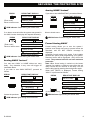
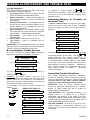
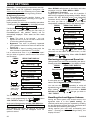
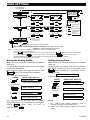
Let us assume that Zone 1 in partition 3 is "open"
and you wish to bypass it, and the rest of the zones
are functional.
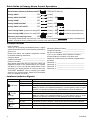
RESULTANT DISPLAY
PRESS
I OK
(alternating)
KITCHEN
<OK> TO BYPASS
I OK
Z01 BYPASSED
Z22 BYPASSED
(alternating)
LIVING ROOM
<OFF> TO CLEAR
I OK
Z22 FUNCTION
(alternating)
LIVING ROOM
You may now click
and then select any
other item on the USER SETTINGS menu, or click
to quit programming. When <OK> TO EXIT
appears - click
I OK .
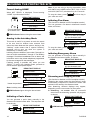
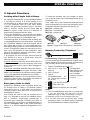
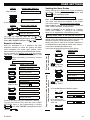
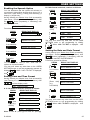
Reviewing the Bypassed Zone List
SET BYPASS
SHOW BYPASS
I OK
(alternating)
Z02 FUNCTION
(alternating)
FRONT DOOR
done, clicking
BYPASS and clicking
<OK> TO EXIT.
You can select any other item on the USER SETTINGS
menu or quit programming by clicking
<OK> TO EXIT is displayed - click
BYPASS LIST
I OK , the number, state and
If at this point you click
name of the first bypassed zone will be displayed.
repeatedly to review all
You can now click
bypassed zones, in ascending numerical order. When
SET BYPASS
. When
I OK button.
At the end of the bypassing operation, BYPASS blinks:
READY BYPASS
or NOT READY BYPASS
This indication will persist as long as the system
remains disarmed, and will disappear once the
system is armed.
20
RESULTANT DISPLAY
Enter user code
KITCHEN
(If you wish
to check the
state of the
next zone)
PRESS
Having entered your user code successfully (see above Entering to the User Settings Menu), the display will read:
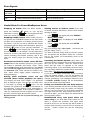
RESULTANT DISPLAY
PRESS
Z01 OPEN
I OK
Note: BYPASS will alternate in the display with other
messages, such as: TRBL, MEM and MSG.
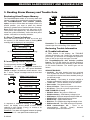
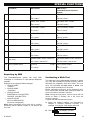
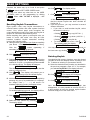
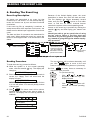
C. "Unbypass" Procedure
Suppose you wish to restore zone 22 of partition 3
after having completed the bypassing scheme. Simply
re-enter the SET BYPASS menu (see Bypassing
or
until
Procedure above), and click
the zone you wish to "unbypass” in the desired
zone/partition is displayed. Refer to the following steps.
will get you back to SHOW
will get you back to
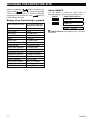
Recalling the Last Bypass Scheme
Arming the alarm system with several zones in the
bypassed state is in fact "partial arming". An
identical partial arming may be repeated by recalling
the last bypassing scheme (that was suspended and
memorized upon disarming the system).
Having entered your user code successfully (see
above - Entering to the User Settings Menu), the
display will read:
D-302016