1
Example Use of Function
•
•
•
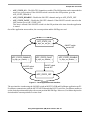
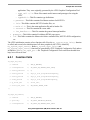
APP_STATE_ON—The SM eTPU channels are enabled. The SM function can be commanded to
move to a given position. If the ON/OFF switch is moved to the OFF position, go to the
APP_STATE_DISABLE.
APP_STATE_DISABLE—Disable the SM eTPU channels and go to APP_STATE_OFF.
APP_STATE_FAULT—Disable the SM eTPU channels. If the ON/OFF switch is moved to the
OFF position, go to APP_STATE_OFF.
This state is entered if the ON/OFF switch is in the ON position at the time when the application
is started.
Out of the application state machine, the current position and the SM flags are read.
APP_STATE_ON
fs_etpu_sm_set_dp(…);
ON/OFF switch
moved OFF
APP_STATE_ENABLE
APP_STATE_FAULT
APP_STATE_DISABLE
fs_etpu_sm_enable(…);
fs_etpu_sm_disable(…);
fs_etpu_sm_disable(…);
ON/OFF switch
moved ON
ON/OFF switch
moved OFF
APP_STATE_OFF
Figure 11. . Demo application state machine.
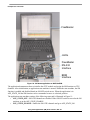
The user interface is made using the ON/OFF switch on MCF523xEVB and FreeMaster application on PC.
FreeMaster communicates with the MCF523xEVB through the RS-232 serial line. FreeMaster enables to
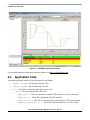
set the desired position and displays the current position and SM flags. Moreover, FreeMaster depicts the
desired and the current positions in a time chart.
Using the Stepper Motor (SM) eTPU Function, Rev. 0.1
Freescale Semiconductor
21