1
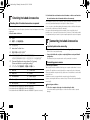
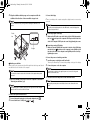
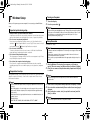
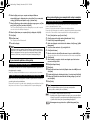
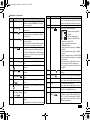
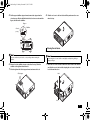
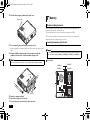
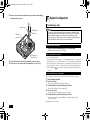
NEC_Mate.fm Page 2 Monday, November 12, 2012 3:39 PM 1 Checking Included Accessories Checking that all included accessories are present Please open up the box and check that all included items and accessories are there. Please immediately contact the place of purchase if any items happen to be missing or damaged. 1. Check contents of the box. 保修书 修理サ−ビス保証規定書 *3 安全使用说明 Instructions For Safe Use *2 安全にお使いいただくために *3 NEC软件的使用条件 【即EULA】(对顾客的特别提示) (请务必先仔细阅读如下内容后,决定是否打开本个人电脑的包装)*1 Terms and Conditions for using software (For Customer) (Please read this before opening the package) *2 2 Important points when connecting ソフトウェアのご使用条件(お客様へのお願い) *3 Base unit Power cord Keyboard Mouse Two stabilizers Cable stopper Screw (×1) Application Disc User's Guide Recovery Disc Connecting Included Accessories *1 *2*3 *1 : Included with model MC32M/B-F and model MC33L/B-F *2 : Included with model MG32M/B-F and model MG33L/B-F *3 : Included with model MG32M/B-F and model MG33L/B-F (Japanese versions) 2 If they happen to differ, please contact the place of purchase immediately. Please also keep your written warranty in a safe place for future reference. If your encounter a breakdown during the warranty period, we shall provide repairs based on the conditions specified in the warranty. For repairs after the warranty period has expired, please consult the place of purchase or one of our specified customer service locations. If it is deemed possible to regain functionality, we are able to perform paid repairs at the customer's request. *1 2. Confirm that the model number and serial number on the base unit matches the model number and serial number written on the warranty. • Do not touch connector terminals when connecting any items. Failure to do so may cause damage. • Connect the LAN cable, only after completing Windows setup and firewall configuration. This ensures that your computer can be safely connected to a network. Connecting power sources 1. Attaching the stabilizers This computer includes stabilizers that keep your computer stable when it is stood vertically. The stabilizers are not attached to the computer at the time of shipment. When you stand the computer vertically, attach one or two stabilizers to ensure that it will not fall over. Stabilizers are not necessary when the computer is placed horizontally. If you are not using the stabilizers, continue to step 2 "Connect the keyboard and the mouse" (p.3). Attaching two stabilizers 1 Place the computer at the edge of a desk and keep it stable. It is recommended to put thick paper or cloth on the desk or table to prevent damage.