1
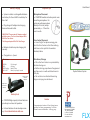
Battery Charging
Important Tips
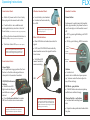
System includes 2 rechargeable batteries:
one battery for the 1st half & one battery for
the 2 half.
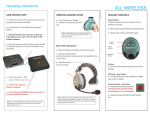
Microphone Placement
l COMSTAR headsets include a special noise
cancelling microphone. For
optimum performance place
directly in front of, and approximately 1 - 2” from the
user’s mouth.
l
Plug charger AC adapter into charging
base and into wall outlet.
l
IMPORTANT: There are two AC adapters supplied
with this system. The Com-Center adapter will fit
ONLY the Com-Center.
The Charger adapter will fit ONLY the Charger.
Batteries should snap into charging slot
securely.
l
l
User Manual
Com-Center Placement
l Line of sight: for optimum range, position the Com-Center so that the radio signals have a clear path to the wireless
headset/radios.
Charge time 2 - 4 hours.
LED Indicators:
- GREEN:
- RED:
- RED Flashing:
- NO LIGHT:
Fully charged
Charging
Battery Faulty
Battery improperly inserted
Charge up to 8
Headset
batteries
Rain Game / Storage
l Place the Com-Center in a protected dry
location during use.
l Before storing, wipe down all equipment
and leave out in a well ventilated room to
fully dry.
l Do not store in individual drawstring
bags or carrying case while wet.
Duplex Wireless System
Charge up to 2
Com-Center
batteries
Battery Facts
COMSTAR high capacity Lithium batteries
provide up to 10 hours of operation.
l
Lithium batteries do not develop a memory. Do not drain batteries after use.
l
Caution
Compartment on bottom of Com-Center houses
switches for factory programming. Call Porta
Phone for more information: 1-800-233-1113.
145 Dean Knauss Drive
Narragansett, RI 02882
Tel: 1-800-399-5994
In RI: 401-782-4966
Fax: 401-789-7300
www.eartec.com
FLX