1
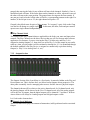
e Rate Lock
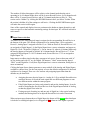
When the CURRENT CLOCK SOURCE is “Internal” and Rate Lock is ON, the driver will
ignore all requests to change the Sample Clock Rate, including those coming from
applications. This effectively causes all files not running at the currently selected clock rate
to be software sample rate converted by the Operating System during playback or recording.
When clocking to an external clock source, the Rate Lock function is effectively ON
regardless of this switch setting, and the rate is locked to the same rate of the incoming clock.
RATE LOCK On is primarily useful in cases where material of various sample rates may be
played, but a static sample rate is desired - for instance when digital devices are connected
that don’t support all of the sample rates desired.
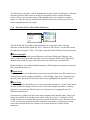
r Synchrolock
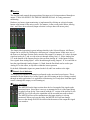
This button can turn the Synchrolock clocking system On and Off. SynchroLock is Lynx’s
proprietary technology for attenuating jitter on clock inputs and providing a stable clock for
all digital signals passed through the Aurora. For information about what Synchrolock does,
and how it does it, see page 13 of the Aurora User’s Guide.
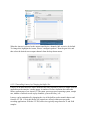
This button also shows the status of the SynchroLock clocking system. Prior to achieving
lock, the four green LED’s give an indication of the completion of various lock stages.
During this time the wide range analog PLL maintains lock.
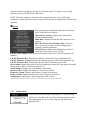
Working: In this state SynchroLock is analyzing the input clock signal and making
adjustments to frequency and phase. This process typically takes two to three minutes to
complete. The four LED’s show progress towards final lock: One green LED denotes
frequency lock to 3.2 ppm accuracy, two LED’s denote frequency lock to 1.6 ppm accuracy,
three LED’s denote frequency lock to 0.6 ppm and the transition to the phase lock stage, four
LED’s denote the start of the phase lock stage. When phase lock has been achieved, the
Yellow “Working” indicator changes to the green “Locked” indication.
Locked: Indicates the SynchroLock system has achieved final lock to an incoming clock
signal. This indicator will also appear when the SYNC SOURCE is set to “Internal”.
Range: Indicates that the selected external clock source is not within the SynchroLock lock
range.
Disabled: Indicates that SynchroLock has been manually disabled using the SynchroLock
control in the Settings menu: Settings->Advanced->SynchroLock
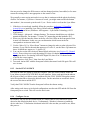
t Preferred Clock Source
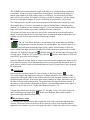
This section of the mixer provides control of the system sample clock generator. All
Aurora/TB play and record devices on a single card MUST have identical sample rates
since there is one on-board generator. Sample rates cannot be changed while the Aurora
is playing or recording, unless “Allow Clock Change if Active” is selected from the Lynx
Mixer Settings > Advanced menu.
Clock sources available to choose from are:
Internal: Clock derived from the on-board crystal oscillator