1
Eye3-Witness-Pro – In Car Video System Specifications
5.
Eye3-WITNESS-PRO Data Management Software
The Eye3-WITNESS-PROsystem is accompanied with an extensive list of applications to Download,
View and Analyze Video and Event data and produce Ad-Hoc Management Reports. Following is a
list of applications packaged with the Eye3-Witness-Pro:
5.1
EYE3-Evidence
The Analysis software is a dashboard driven application that allows the user to analyze a
recording clip downloaded by either of the 4 methods of download. Depending on the type
of download, the unit generates either a .CAR or .M65 or .p10, p11, .p12 or .p13 file. Any of
these files may be opened in the Analysis software to get a view of the Video, Audio, GPS
location, Speed, Event Data, Inertia Sensor data etc.
The Eye3-Witness-Pro unit can be configured to record data in increments of 15minutes, 30
minutes or 45 minutes. When data is downloaded using either of the 4 methods of
download, the data file contains the pre-defined minutes of video data. It is recommended to
set the Eye3-WITNESS-PROto create data in 15 minute packets.
The Analysis playback software works with different kinds of mapping software to display
the vehicle location. The Google version of the software requires an internet connection and
enables the customer to track the vehicle across county, city and state lines. The Google
maps version is licensed and available at an incremental cost.
5.2
EYE3-Dispatch Live View Software
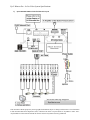
The Eye3Dispatch Live View Software provides the customer the ability to remotely view
cameras inside the bus over a Wireless connection. To access the Eye3Dispatch Live View
Software, the bus either has to be in a WIFI network or a cellular network. To access
video/audio data via a Cellular network, a separate WIFI card from SPRINT, AT&T or
VERIZON is required.
The Eye3Dispatch Live View Client Software has the ability to view up to 32 buses in one
single session, this could equate to 1 camera each from 32 buses or a combination of
cameras from a number of buses.
The Eye3Dispatch Live View Client Software provides the capability to change the
configuration on the vehicle system remotely, search for video/audio data on the vehicle and
download it to a local machine for viewing locally. More details about the software can be
found on the Eye3Dispatch Live View User Manual.
5.3
Eye3-Connect Auto-Download Software
The Auto-download server is installed at the facility where audio/video data needs to be
captured. The Auto-download server is an advanced application that can manage, monitor
and connect to multiple vehicle units concurrently (depending on network bandwidth).
While the connection is established, the server would trigger a scheduled download of Video
and/or events from the vehicle to the Auto-download server.
This document contains proprietary and copyrighted information subject to change without notice. The information
in this document shall not be duplicated, used, or disclosed in whole or in part outside of Eye3Data © 2006 - 2013.
Any distribution of this material without the written consent of Eye3Data is strictly prohibited.