1
TABLE OF CONTENTS
1
BEFORE YOU START ......................................................................................................................................................................4
1.1
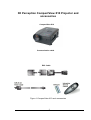
Accessories.................................................................................................................................................................................4
1.2
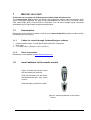
Insert batteries in the remote control ..........................................................................................................................................4
2
IMPORTANT NOTICE ......................................................................................................................................................................5
3
CONNECTING A SOURCE SIGNAL TO THE COMPACTVIEW X10 PROJECTOR ......................................................................................6
3.1
Connecting an image generator to the CompactView X10 Projector .........................................................................................6
3.2
Connecting a Computer Graphics Source to the CompactView X10 Projector ..........................................................................6
4
COMPACTCONTROL AND COMPACTDESIGNER SOFTWARE PACKAGE ..............................................................................................8
4.1
About CompactControl................................................................................................................................................................8
4.2
About CompactDesigner.............................................................................................................................................................8
4.3
Installation...................................................................................................................................................................................8
4.4
Software License ........................................................................................................................................................................9
5
GETTING STARTED WITH COMPACTVIEW X10...............................................................................................................................10
5.1
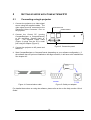
Connecting a single projector ...................................................................................................................................................10
5.2
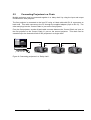
Connecting Projectors in a Chain .............................................................................................................................................11
6
USING THE COMPACTVIEW X10 PROJECTOR ...............................................................................................................................12
6.1
Different program modes for the COMPACTVIEW X10 projector.................................................................................................12
6.2
COMPACTVIEW X10 Remote Control .........................................................................................................................................13
6.3
Using the touch panel on the COMPACTVIEW X10 projector......................................................................................................15
6.4
Adjusting the height and angle of the COMPACTVIEW 10 projector ...........................................................................................16
6.5
Adjusting Focus/Zoom on the COMPACTVIEW X10 projector.....................................................................................................16
7
USING THE MENUS ......................................................................................................................................................................17
7.1
Main menu ................................................................................................................................................................................17
7.2
Set-up menu .............................................................................................................................................................................18
7.3
Control panel menu...................................................................................................................................................................21
7.4
Product information...................................................................................................................................................................24
8
MAINTENANCE ............................................................................................................................................................................25
9
WHAT TO DO IF (TROUBLE SHOOTING) .........................................................................................................................................26
9.1
Further assistance ....................................................................................................................................................................27
10
TECHNICAL SPECIFICATIONS .......................................................................................................................................................28
11
LIMITED WARRANTY, ‘FCC STATEMENT’ AND ‘TRADEMARKS COPYRIGHT’.....................................................................................30
3