1
Micro-g LaCoste Tele-g Remote Operation User’s Manual
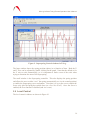
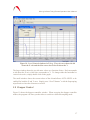
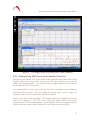
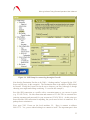
Figure 13. VNC display with Tele-g running on a remote computer.
4.2.1 Setting up the VNC Server on the System Controller
The first step is to run the VNC Server on the system controller (which will be the remote
machine when accessed from afar). Simply run VNC Server and take note of the IP
address and “desktop number”. It is also necessary to assign a password for the session
the first time the VNC Server is run.
It is recommended to create a shortcut for the VNC Server and place it in the Windows
Start Menu Startup folder. This way during any reboot (after a power outage, for
example), remote access to the machine will still be possible.
Finally, a note about “desktop number”. The desktop numbers are assigned by the server
and can be 0 through 9. The VNC Server opens port number 590X on the server
computer where X is the desktop number. As an example, if the server assigns desktop 0
for the session, the system will be listening for viewer connections on port 5900.
21