1
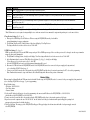
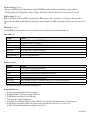
FACP Trigger (Fig. 8, pg. 10): From the pull down menu select how the output will operate when the FACP input is triggered.
FACP Trigger Setting Function/Description
Inactive
The selected output will not switch when the FACP input is triggered.
Non Latching
The selected output will switch when the FACP input is triggered and reset when the FACP trigger input is returns to a non-triggered state.
The selected output will switch to a latched position when the FACP input is triggered. The selected output will remain latched until
Latching
the Output Reset is triggered.
Battery Backup (Fig. 8, pg. 10): From the pull down menu select Yes if the output will remain ON in the event of a power failure.
Select No if the output will turn OFF in the event of a power failure.
Output Status (Fig. 8, pg. 10): Output Status indicates if the output is On (powered) or Off (not powered).
The output can be turned on or off the clicking [On/Off] button. After all fields have been programmed, click on [Submit Setting] button,
a dialog box will display, New Setting Submitted click “OK”. All programmed information in now saved.
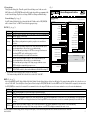
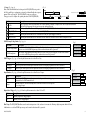
3. Security Settings (Fig. 9, pg. 11):
Click on [Security Settings] tab. The LINQ8PD(CB) security setting page will open. This section is used to enable/disable Secure Socket Layer (SSL) and to change
Username and Password. SSL will encrypt all the communication
Fig. 9
with a secure key. An SSL certificate could be self-signed
Device Management Interface
or obtained from a third party certification company.
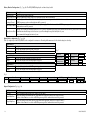
SSL Certificate Setting (Fig. 9a, pg. 11):
Generating a self-signed SSL Certificate and Key.
Field Name
Description
Two letter code representing the state
State
where the organization is located.
Location
The city where the organization is located.
The legal name of the organization.
Organization
This should not be abbreviated, and should
include suffixes such as Inc., Corp, or LLC.
Unit Name
Name of the device.
Domain name or IP address of the server. This is
Common Name
typically assigned by the network administrator.
Email Address
An email address used to contact the organization.
Status
Setup
Network Settings
Security Settings
Events Log
Help
Security Settings
eFlow
Monday, Sept. 21 2015 [2:30 pm]
Site ID: LINQ8
A
SSL Certificate Settings:
State:
SSL Status:
Certificate Status: No Cert
B
Key Status: No Key
Locality:
SSL State:
Organization:
Unit Name:
Off
Turn SSL On
Change Username and Password:
Common Name:
Username:
Email Address:
C
Password:
Submit SSL Settings
Confirm Password:
Save Username and Password
After all fields have been completed click [Submit SSL Settings] button, a dialog box will appear “Please allow up to 30 sec for server to reboot” click “OK”.
A self-signed SSL certificate will be generated with the information provided in the “SSL certificate settings” fields. The certificate will be valid for 500 days, and time stamped
with the time settings present on the LINQ8PD(CB) module. The date and time must be synced with the host computer before generating an SSL certificate.
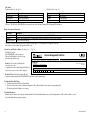
Using a private SSL certificate and Key:
Private SSL Certificates and Keys must be uploaded using the Altronix Dashboard. For additional information refer to the Altronix Dashboard setup/user
manual section “Updating firmware / SSL certificate and Key”.
LINQ8PD/LINQ8PDCB
- 11 -