1
English
Operation
Making a call
Regular dialling
1. Pick up the handset.
2. Enter the desired number.
Redial function
If a number was engaged or if you wish to redial the
most recently entered number, pick up the handset and
press the redial button
.
Memories
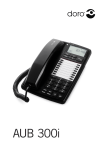
This telephone has 4 speed dial memories.
Once a number has been saved in a memory location,
you only need to press one button to make the call. A
picture or symbol can be placed under the transparent
cover on the speed dial buttons so it is easy to see who
you are calling.
Dialling with speed dial
1. Pick up the handset and wait for the dialling tone.
2. Select required speed dial by pressing on the
appropriate button.
Volume control
This product can adjust the sound in a number of ways:
Normal volume control for the handset.
Change frequency range/sound level and
quality (on the left side).
Hearing loop
The handset has a built-in hearing loop for those who wish
to use their hearing aids while using the telephone. Select
the T mode on your hearing aid to enable this feature.