1
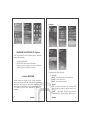
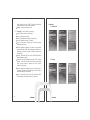
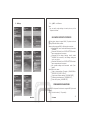
3. Settings
2.4. „„Exit” – exit Browser
Note:
You can easily make settings at www.b-phone.eu, in the
“B-phone User Area”.
SMS WITH DEFINITE CONTENTS
If your phone does not support JAVA*, B-phone can be set
using SMS with definite content.
When sending command SMS to B-phone phone number:
Command SMS “must” contain the following information:
„B-PHONE”.
Command SMS should be in CAPITAL LETTERS and between commands must be a space.
Command SMS to change settings should contain
„B-PHONE CAL1=xxxxxxxx”, the following settings are
up to your choice.
Command SMS should be in CAPITAL LETTERS and between commands must be a space.
See possible settings and commands under „Commands”.
Send SMS in such cases:
To set or change settings (Example: „B-PHONE CAL1=
22222222 SP=120 PR=3 SD=8”),
To get current B-phone settings („B-PHONE INFO”),
To refuse the detected event („B-PHONE OUT”),
To turn off B-phone („B-PHONE OFF”).
COMMAND EXPLANATIONS
B-PHONE is a keyword for device to recognise SMS (to be used
always).
CAL1 - first call number (1..20 symbols).
12
13