1
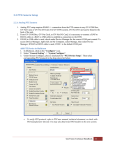
5.8.12 Fingerprint Enrollment In order to enroll fingerprint in ASManager, it is required to connect GV-GF1901 to ASManager directly via GV-COM or GV-Net Card. 1. Under ASManager, select “Cardholders”. 2. Under Cardholder list, select the desired card holder. 3. Under Fingerprint tab, click “Search” to locate the GV-Fingerprint reader connected to ASManager. If a GV-Fingerprint reader is not found, verify COM port and RS485 connection as shown above in the connection diagram. GeoVision Technical Handbook 107