1
1
Introduction
This computer exercise is an introduction to the calculation program Capcal 3. Capcal
(CAPacity CALculation) is a computer program for calculating effects of intersections and
roundabouts. In this exercise you will practice calculations of non-signal intersection, signal
intersections, and roundabouts. For some of the tasks will blueprints from VU-94 (Road
design 94) be used, these blueprints is available in the appendix (but not in digital form).
Except the guidance in this document there is also a program manual at c:\program\capcal3
(unfortunately only in Swedish) and a help function which can be accessed via the F1-button
on the keyboard.
The aim with this exercise is to increase your knowledge on different intersections types’
effects intersection performance. The aim is also to increase the understanding of how
different traffic signal strategies work and which effect they have on an intersection. The
examination in the traffic signal part in the course TNK062 Traffic modeling will include a
small project with Capcal and the aim of this exercise is therefore also to give basic
knowledge for running Capcal.
In this document will menu and tab choices be written in bold style, for example: perform
calculation (Calculation, Intersection).
Input and calculation
Start Capcal from the shortcut on the start menu and program\Capcal\. Input data to Capcal is
prepared in the tabs Geometry/overview, Volumes, and Signal. There is also a tab for Report
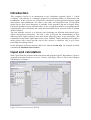
and Printout, see Figure 1.
Figure 1 Screen picture from CAPCAL