1
Plug & play PTZ IP Camera
1. Preparation
Check your Package
·Camera * 1
·Cable * 1
·Power Supply * 1
·Antenna * 1
·CD with software
·and Manual * 1
·Bracket * 1
·Screw * 1 set
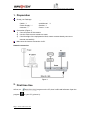
Connection (Figure 1)
1) Connect power of the camera
2) Use the cable connect camera to router
3) If the blue light of the equipment is blink, means camera already connect to
Internet successfully.
Make sure the internet connection is OK.
Network connection
Figure 1
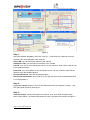
2. First time Use
At first, run
program
program on the CD, then it will install software .Open the
on your PC ( picture 2).
http:// www.wansview.com