1
Video Settings
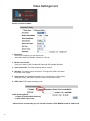
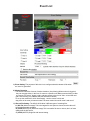
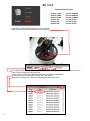
Image Setting: You can adjust the following items on this camera:
1.
2.
3.
4
5.
6.
7.
8
9.
10.
11.
12.
13.
14.
Brightness:
This adjusts the brightness level of the camera
Contrast:
This adjusts the difference in color and light between parts of an image
Hue:
This adjusts the hue of the camera
Saturation:
This adjusts the color saturation of the camera.
Sharpness:
This adjusts how sharp the image appears
AGC:
This adjusts the automatic gain control
Shutter Time:
This adjust the shutter speed to reflect various lighting conditions
Sense-Up:
This allows adjustments of selectable digital slow shutter speeds
D-WDR:
This adjusts digital WDR
Video Orientation: This adjusts video orientation
Day & Night:
This allows many options for manually setting camera mode
Night to Day Lux: This allows manual setting of day and night lux levels
Current Lux:
This tells you what your current lux level is
DNR:
This allows adjustment of digital noise reduction
1
2
3
4
5
6
7
8
9
10
11
12
13
14
You can reset your IP camera’s image settings to default by pressing the “default” button
23