1
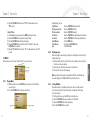
(3) On the main menu, push the PLAY/NAVI button to select “Settings” and press the
PLAY/NAVI button to display the settings.
(4) Select “Video Out” and press the PLAY/NAVI button to confirm.
(5) Move the PLAY/NAVI button up or down to select “TV-PAL” or “TV-NTSC”
depending on the TV/video standard, and press the PLAY/NAVI button to confirm.
When the settings have been adjusted as shown above the operating window will be transferred
to the TV screen. You can use the keys to operate the device and view the result on the TV screen.
Note: To leave TV mode and switch the screen output back to the device, go to Settings mode
and set the “Video Out” to “LCD”.
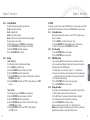
1.13 Locking the keys
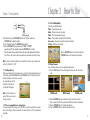
When you are listening to music or playing a movie, you can lock the keys against being pressed
accidentally by using the Hold Switch. Slide the Hold Switch to the left to lock the keys. A lock
indication will appear on the top bar (see below).
To re-enable the keys, slide the
Hold Switch to the right. The
lock indicator will disappear.
Note: You can still power on or
power off the device even when
the keys are locked.
1.14 Use as a removable mass storage device
The device has built-in flash memory of up to 128MB. It can be used as a portable mass storage
device to store all types of files and documents. Just connect the device to a PC, and download or
upload data.
48
Chapter 2 How to Use
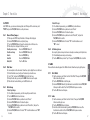
2.1 Select Working Mode
This device has six Working Modes:
Video – Play and manage videos.
Audio – Play music and record voice input.
Photo – View and mange photos/images.
Game – Play fun games including Tetris World and Snake.
Accessories – View electronic calendar and system information.
Setting – Customise system settings.
Move the PLAY/NAVI button to Select mode and press the
PLAY/NAVI button to enter the working mode selected.
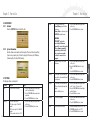
2.2 Using the menu
To use menu items when you are in the appropriate working mode:
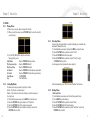
(1) Press the MENU button on the screen that appears first when you enter the selected
mode.
(VIDEO mode)
(MUSIC mode)
Englisch
Chapter 1 Getting Started
(PHOTO mode)
(2) Move thePLAY/NAVI button up and down to the select item from the menu list.
(Note: an arrow to the left of the menu item means that item is divided into submenus).
(3) Move the PLAY/NAVI button left to display the submenus.
(4) Press the PLAY/NAVI button to confirm the selected menu item.
49