1
This ADAPT-PT/RC 2015 Getting Started Tutorial is intended to be used as a practical
example and guide for modeling a 2D post-tensioned two-way slab frame in the PT mode
of the program. While the example is related to a specific system type (two-way slab) the
workflow applies to input of one-way slabs and beams. For additional information, refer
to the ADAPT-PT/RC 2015 Getting Started Tutorial for RC mode and the ADAPTPT/RC 2015 User Manual. Both documents can be accessed from the HELP menu of
the program.
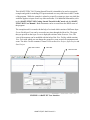
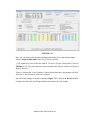
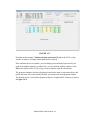
The example model is created with the help of a wizard which consists of different Input
Forms. Each Input Form can be accessed at any time through the Menu Bar. The input
that you provide on the Input Forms is displayed real-time in the Structure View. The
view of the structure can be modified with the help of the View Toolbar which contains
View Tools with which you can change the perspective, turn on and off components and
zoom. The Main Toolbar contains Common Tools such as New Project, Open Project and
Save Project.
Main Toolbar
Menu Bar
Structure View
Input Forms
FIGURE 1: ADAPT-PT User Interface
ADAPT-PT/RC® 2015-Tutorial- 2