1
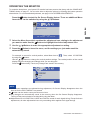
AUTO ADJUST H-POSITION V-POSITION H-SIZE FINE Adjustment Item AUTO ADJUST *1 Direct Problem / Option Adjust H/V-POSITION, H-SIZE and FINE automatically. H-POSITION Too left Too right V-POSITION Too low Too high H-SIZE *2 Too narrow Too wide FINE *2 Button to Press To correct flickering text or lines *1 For best results, use the Auto Adjust in conjunction with the adjustment pattern. See page 14 for SCREEN ADJUSTMENTS. *2 See page 14 for SCREEN ADJUSTMENTS. Direct You can skip the Menu items and display an adjustment scale directly by using the following button operations. AUTO ADJUST: Press the Button when the Menu is not displayed. OPERATING THE MONITOR 11 ENGLISH Only Analog Input