1
2.2 Auto Scroll
Current/Thermal Display
When auto scroll is enabled, the display scrolls between
currents and thermal reading every 10 seconds. To
toggle auto scroll mode, press "UP" and "DOWN"
simultaneously.
Tripping History
1 t6X Thermal overload time constant
2.3 LED Display
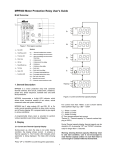
a) Run LED
2 I>> Short circuit
Run LED shows the motor status. Refer to 3.2.1 Motor
Starting.
Off
Motor stopping
Blink
Motor starting
On
Motor running
3 t>> Short circuit delay time
4 I<< Undercurrent
5 t<< Undercurrent delay time
b) Trip LED
Trip LED is normally off. During tripping pickup, where
tripping delay is counting down, Trip LED blinks. Trip
LED on during tripping.
Off
Normal
Blink
Pickup
On
Tripping
Blink
Thermal overload warning
On
Thermal overload tripping
Thermal capacity high, R1 off
7 t
Unbalance delay time
9 t0 >> Earth fault delay time
A IS >> Prolonged starting / stalled rotor
Thermal LED blinks when motor current is more than
105% of IB. Thermal LED on during thermal overload
tripping, and when thermal capacity is more than 40%
after overload tripping (in which R1 is off, motor not
allowed to start)
Normal
Unbalance
8 I0 >> Earth fault
c) Thermal LED
Off
6
b t Start >> Prolonged starting delay time
c t Stall >> Stalled rotor delay time
d IB Base/full load current
E External CT ratio
F1 Auto/Manual Reset
3. Settings and Protection Features
3.1 Setting Display
F2 Binary input
When the relay is not under tripping condition, pressing
"RESET/MODE" will scroll through various settings.
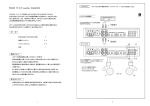
Function LED showing number or alphabet to indicate
which setting is being view as shown in Figure 3. Table 1
gives description of each setting.
F3 Relay 2 function
F4 Phase Sequence/ Phase Loss option
Tip: To quickly jump back to current/thermal display
during setting display, press and hold "RESET/MODE"
for 1.5 second.
F5 Frequency
Figure 3: Display mode when pressing
Reset/Mode
2