1
Table of Contents
1.
About This Manual ................................................................................... 1-1
1.1
1.2
1.3
1.4
1.5
1.6
1.7
1.8
2.
1-1
1-1
1-1
1-1
1-2
1-2
1-2
1-2
1-2
1-3
Creating Electronic Fund Transfer Interfaces ...................................... 2-1
2.1
2.2
2.3
2.4
2.5
2.6
2.7
2.8
3.
Introduction..............................................................................................................
Related Documents .................................................................................................
Audience..................................................................................................................
Organization ............................................................................................................
Conventions Used in this Manual ............................................................................
1.5.1 General Conventions..................................................................................
1.5.2 Keyboard Conventions ...............................................................................
Glossary of Icons.....................................................................................................
Abbreviations and Acronyms...................................................................................
Getting Help.............................................................................................................
Introduction.............................................................................................................. 2-1
Creating Transfer Instruction Files .......................................................................... 2-1
Few Basic Terms..................................................................................................... 2-1
2.3.1 Generating EFT Files ................................................................................ 2-2
2.3.2 Re-exporting Batch EFT File ...................................................................... 2-3
EFT Batch Generation Screen ................................................................................ 2-3
2.4.1 Generating EFT Batch in this Screen ......................................................... 2-3
2.4.2 Fields in EFT Setup Screen........................................................................ 2-4
2.4.3 Reports Printed on Saving EFT Batch........................................................ 2-6
EFT Batch Maintenance (Summary) Screen........................................................... 2-7
2.5.1 Retrieving Batch in EFT Setup Summary Screen ...................................... 2-7
2.5.2 Editing Record ............................................................................................ 2-8
2.5.3 Viewing Record .......................................................................................... 2-9
2.5.4 Authorizing Record ..................................................................................... 2-9
2.5.5 Amending Record....................................................................................... 2-9
2.5.6 Authorizing Amended Record................................................................... 2-10
2.5.7 Copying Attributes ................................................................................... 2-10
Marking a Batch for Re-Export .............................................................................. 2-10
Payment Clearing Screen...................................................................................... 2-11
2.7.1 Fields in Payment Clearing Screen .......................................................... 2-11
Payment Clearing Summary Screen ..................................................................... 2-12
2.8.1 Retrieving Record in Payment Clearing Summary Screens ..................... 2-13
2.8.2 Editing Transaction................................................................................... 2-13
2.8.3 Viewing Transaction ................................................................................. 2-14
2.8.4 Deleting Transaction................................................................................. 2-14
2.8.5 Authorizing Transaction............................................................................ 2-14
2.8.6 Amending Transaction.............................................................................. 2-15
2.8.7 Authorizing Amended Transactions.......................................................... 2-15
2.8.8 Copying Attributes ................................................................................... 2-15
2.8.9 To Clear or Reject Settlement .................................................................. 2-15
Processing SWIFT Messages ................................................................. 3-1
3.1
3.2
Introduction.............................................................................................................. 3-1
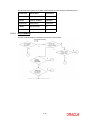
Transaction Workflow .............................................................................................. 3-1
3.2.1 Incoming SWIFT Bulk/Multiple Orders ....................................................... 3-1