1
OTHER FEATURES
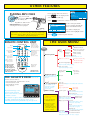
PLAYING MP3 FILES
MP3 CD
Play, select tracks,
stop and eject MP3 CDs
like an ordinary CD.
Selects between
CD and USB
flash drives
GOTO
allows you to select
track numbers
greater than 9
LEVEL
1
2
3
4
5
6
7
8
9
GOTO
0
CUE
Recordable
Remaining 96:39
files
Press
Off (Stand-by)
unit can only be
switched on using
the keypad ON/OFF
key or at the mains
Manual Record Level
(when manual
record level has
been selected)
Up / Down
(as rotary control)
input
Use the soft keys below the
screen to navigate through the
folders and individual tracks.
folder
Press folder to display the
contents of the highlighted item.
to listen to your selection.
THE USER MENU
Record level mode
Automatic record level
Microphone
settings
Two microphone setup
2 mics are a stereo pair
Microphone
sensitivity
High sensitivity
Manual record level
MENU
Record options
2 mics are dual mono
Low sensitivity
Turn phantom power on
Select to turn phantom power on or off
Record to one disc only
Dual disc record mode
Track 21 would be
reached by pressing
GOTO, 2 and 1
Features found
on the remote
are the same as
on the keypad or
the menu, except
for those differences
indicated here.
files
to show the contents of the drive.
back
REMOTE CONTROL UNIT
A/B
Press
until the display shows
“Pen 1” and the USB logo.
COOMBER
DANCE CLUB
HISTORY FOLK SONGS
WAKE AND SHAKE
Audio/MP3 files and folders play in order of placement on
a flash drive. A selected track (file) will play, followed by
the next in the list. When all files have been played the
next folder is opened and played.
Record
Pen 1
Select
Play MP3 or audio from a
USB flash drive by locating and
selecting the file to be played.
Open / Close
Insert the flash drive into the slot.
Record to both discs
INTRO
SPEED
TREB
RAND
PROG
BASS
REP
MUTE
BAL
Continuous record
Record from digital input
Option not visible during recording.
Mute / Unmute
speakers and
headphones
Fade out recording
Option visible during recording.
Replacement
Part No. 1920
Repeat options
no repeat
Programme
repeat track
repeat disc
Playback options
THE CASSETTE DECK
6121 & 6131 only
Use the cassette deck to:• Record from CD, external source or mic
• Record cassette to CD
• Record CD to cassette
• Play cassettes
To prevent damage to the
cassette heads and door,
please ensure that the cassette
is loaded as shown.
The software recognises when a cassette is playing or
recording. Information will appear on the screen
indicating activities being undertaken by the tape deck.
options appear when a CD
with audio tracks has been
inserted.
Random
Intro
Erase†
& copy functions
Erase disc
Erase last track Option only available with LiteOn drives
erase functions are only
visible when a CD-RW
with audio tracks has
been inserted.
Copy disc
Other settings
Speaker options
Options in red are only
available on 6130/6131
models only.
Turn PA mode on
Select for public address via mic.
Disable keypad
Keypad & remote options
Disable keypad can only be
Disable remote
deselected by restarting the unit.
† Option appears when
a CD-RW is inserted.
Tick indicates default
selection at startup.
All options can be
cancelled via the menu
and default settings are
resumed on startup.
Copy or splice tracks
Copy tracks
Splice tracks
Display options
Mute speakers
Select to mute/unmute speakers.
Contrast
Select to adjust display contrast
using rotary control knob.
Invert
Select to invert the LCD image
from positive to negative.
Backlight Off
Select to switch off the backlight.
Show build information
Service Info
Shows information
Show drive information
about your Real Time
CD Recorder - useful info for advice or support.