1
6
C# Software
6.1
Requirements
• Microsoft Windows XP or newer
• Microsoft Visual Studio (2008 or later recommended)
• Windows Mobile 6 Professional Software Development Kit
• Microsoft Activesync
Note: Activesync and the Mobile 6 Professional SDK are available for free from Microsoft.
6.2
Installing the Software
The code is written in C# and can be opened using Microsoft Visual Studio. The SenseME.Mobile
solution file (.sln) is in the code’s root directory. Visual Studio lists the files used in the project
on the right hand side (by default). The main function is located in “Program.cs”. The two
windows in the program each have a designer file and a code file. The designer file simply
describes the physical setup of the window. The code file runs the features of the window.
Visual Studio also provides methods to compile, build, and install the program onto the
MC9090. In order to install, or deploy, the solution to the MC9090, one must have Microsoft
Activesync installed on their computer. Activesync allows communication between the MC9090
and the computer to allow transfer of files. Visual Studio should install the executable in the
My Devices>My Program directory of the MC9090.
The code is available for download at the WiSe-Net website.
6.3
How To Use
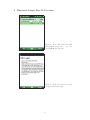
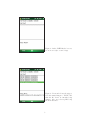
This program is designed to be very simple to use. Upon start, a simple “How To” procedure
is shown to the user describing, very simply, how to use the software, as shown in Figure 4.
Figure 4: Welcome Screen
4