1
█
CNC-200A USER MANUAL
VER. H8681/3
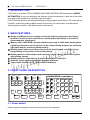
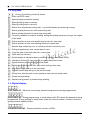
3.2. Key pads
~ :10 key, for entering numerical values.
:Enter into EDIT mode.
:Specify target production quantity.
:Specify starting step in memory.
:Specify ending step in memory.
:Select item of parameter during edit , or to switch display mode during running.
:Select guiding direction for each step during edit.
:Select winding direction for each step during edit.
:To specify whether to suspend winding, during the guiding traverse moving to the edges
of the width.
:Select whether to have auto-positioning function for each step.
:Select whether to have auto-starting function for each step.
:Reduce step number by one, or reduce production counter by one.
:During programming, clear current data to zero.
:Copy the data of previous step into current step.
:Write data into memory.
:Switch display to shows between production counter and speed (RPM).
:Hold down this key for two seconds to reset production counter.
:Switch between automatic and manual mode.
:Switch the brake between lock and unlock during motor stop.
:Skip current step and go to the next step.
:Discard current step and go to the previous step
:At any time, discontinues current operation and return to ready mode.
:Pause during winding.
:Restart during pause, or pause during winding.
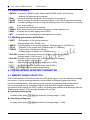
3.3. Digital display
STEP DISPLAY:Show the current step number being wound or being programmed.
DATA DISPLAY:During programming, in combination with LED, shows the parameter being
programmed. During winding or ready mode, show the current number of turns or show the
guiding traverse shafts position.
COUNTER DISPLAY:Shows production counter or RPM.
Page 3 of 14