1
Important Information About Your GPS
Rand McNally Dock: Keep your device up to date by downloading the Rand McNally Dock for your home
computer at www.randmcnally.com/dock and connecting your device with the USB cable provided.
Wi-Fi®: Some features of this device require wireless connectivity, which requires a supporting feature and
data plan from your wireless service provider. As the user, you are responsible for all data charges. Please
contact your wireless service provider to make sure you do not exceed the limits of your data plan.
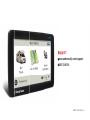
Power Button: Press and hold the orange power button to turn the device on or off. The power button can
also be used for quick access to certain features while the device is running. See Preferences > General >
Quick Power Press for options. A red light indicates the battery is charging; a green light indicates the
battery is fully charged.
Reset: Use the reset button on the back of the device to restart. This will cancel the current route, but
preferences, address book, and other personal data will be saved.
Learn More: Access the Tutorial under Preferences > General on your device for more information,
or visit www.randmcnally.com/support to download the user manual.
1