1
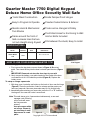
SureDrop 7925 Digital Keypad Deluxe
Depository Safe & SureDrop 7900 Digital
Keypad Double Depository Safe
Extra Thick 11 Gauge
Solid Steel Construction
Inside Tamper-Proof Hinges
Powder-Coated Interior & Exterior
Easy to Program & Operate
Code can be changed infinitely
Resists Hand & Mechanical
Tool Attacks
Opens by Key or Electronic
Lock
SPECIFICATIONS
Bolt
Pre-Drilled Holes for Anchoring to Wall
Front loading, fitted with a Sawtooth edge
tilting baffle plate to prevent "fishing out"
Note: 7900 is a Double Drop or two
separate safes in one!
Dimensions
Model
Material
SureDrop 7900
Steel
Double Deposit
with top drop
30.5”H x 14.5”W x 14”D
SureDrop 7925
Steel
Deposit
17.7”H x 13.7”W x 12”D
Figure A
HOW TO USE YOUR SUREDROP 7900, 7925
Before using your safe:
1. First, remove the battery cover plate on the keypad and open
the door with the key provided (Figure A). Keep the door
open. IMPORTANT: Please do not store the door keys in
your safe!
2. Next, install the 4 AA 1.5V batteries provided (Figure B).
Replace the battery cover.
Figure B
Figure C
To setup or change a user passcode:
1. With door open, locate the red button on the back of door near the hinge
Figure D
(Figure C). Press the red button, and the screen will display “-----”.
Immediately press the Start button on the keypad and enter your new user passcode. New user
passcodes should be 6 digits long. Note: This safe stores up to 2 passcodes simultaneously; a user
code and a manager code.
2. Immediately after entering your new code, the screen should display “IN”. Your new user code is now
stored. Entering a third code will erase the first passcode entered. If the screen does not display “IN”
after entering a passcode, repeat steps 1-2 above making sure to press the Start button quickly after
pressing the red button. Your safe comes with a set of keys. Please do not store keys in safe!
Keep secure in a safe place.
25
Copyright 2010 DTX International