1
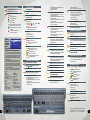
INPUT/OUTPUT
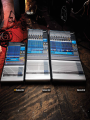
24 main inputs, each with XLR mic, ¼” balanced
line, and ¼” unbalanced inserts
16 main inputs, each with XLR mic, ¼” balanced
line, and ¼” unbalanced inserts
16 main inputs
BNC 12V lamp socket
Optional dust covers available
INCLUDED SOFTWARE
Universal Control control-panel application for Mac® OS X
and Windows®
•12 with XLR mic
•16 with ¼” balanced line
•4 (2 L/R pairs) with RCA line
RCA stereo (L/R) tape inputs and outputs
XLR stereo (L/R) main outputs with level control
¼” balanced stereo (L/R) main outputs
XLR mono output with level control
¼” balanced stereo (L/R) control-room outputs
¼” headphone output
4 ¼” subgroup outputs
10 /
6/
4 ¼” balanced aux outputs
24 pre-insert, pre-converter balanced direct outputs, Ch. 1-8, 9-16, 17-24 (DB25 sockets) / 16 pre-insert,
pre-converter balanced direct outputs, Ch. 1-8, 9-16
(DB25 sockets)
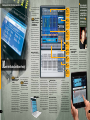
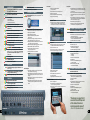
•See all the most-used parameters
on the mixer at once
•See the state of all Fat Channel settings at once
•See all aux mixes at once
•See the current effects and parameter settings
•See graphic equalizer settings
Multiple Views
•Overview displays the most-used parameters, such as channel levels, mutes, panning, EQ curves, and more for multiple
channels at once
•Tap for a closeup view of Fat Channel processing. Navigate
between gate, compressor, EQ, and so on with the flick of a
fingertip.
•Aux view shows you the levels, panning, and Fat Channel
processing for the Aux sends and internal FX. Move between
processors with a flick of a fingertip.
•GEQ view lets you adjust the graphic EQ .
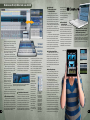
•Hold your iPad in Portrait position to see every available
parameter for the currently selected channel
Studio One™ Artist
•PreSonus’ revolutionary new digital-audio workstation with
unlimited track count and 4+ GB of third-party resources.
www.presonus.com or our 2011 Full Line Brochure for details.
2 ¼” balanced stereo (L/R) aux inputs
1 XLR talkback-mic input with phantom power and
level control
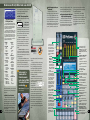
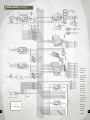
Mixer Overview
Computer System Requirements
Virtual StudioLive™ (part of Universal Control)
•Bidirectional control of commonly used mixer parameters
•Easy drag-and-drop workflow
•Drag presets directly to channels
•Drag parts of presets directly to components in
the Fat Channel
•Adjust the Fat Channel gate, compressor, and EQ and the
graphic EQ and effects in a huge pop-up window
•Quickly drop entire Scenes to the mixer for instant recall of all
channel, effects, and graphic EQ settings
•Load effects quickly by simply dragging presets into the GUI
• Makes StudioLive as easy to use as Studio One
•Use the mouse to quickly assign channels to
multiple buses, mute, solo, etc.
•Timestamped backups of the entire board
Studio One Artist, Virtual StudioLive, and Capture
Windows®
•Windows XP SP2 (32- or 64-bit) or later, Vista (32- or 64-bit),
or Windows 7 (32- or 64-bit)
•Intel Pentium 4 1.6 GHz processor or AMD Athlon 64
(Turion) (2.5 GHz or faster recommended)
•1 GB RAM (2 GB or more recommended)
Capture™ 1.1
•Multitrack recording application (unlimited input channels
and stereo stream from StudioLive) for Mac® and PC
•Record with two mouse clicks
•Essential editing suite (copy, cut, paste, splice, resize)
•Peak LED-style meter bridge with clip indicators
Mac®
•Mac OS X 10.5.2 or later
•Intel Core Solo 1.5 GHz processor
(2 GHz or faster recommended)
•1 GB RAM (2 GB or more recommended)
•FireWire 400 (IEEE 1394) port or
FireWire 800
with adapter
•Internet connection recommended
•DVD-ROM drive
•Internal or external 7200 RPM storage drive
highly recommended
•Monitor resolution for PC and Mac
no lower than 1024x768 pixels
S/PDIF digital out
2 FireWire 400 ports
MIDI In and Out (5-pin DIN)
DIGITALIA
High-definition analog-to-digital converters (118 dB
dynamic range)
Unlimited-headroom, 32-bit floating point, digital
mixing and effects processing
Internal sample frequency 44.1 kHz and 48 kHz
PHYSICAL
Rugged, non-flex steel chassis
100 mm long-throw faders
60 mm long-throw faders
Military-grade, quick-touch buttons
Windows and Mac Systems
Preset Management
•Store and organize presets on your computer, then transfer
them to your mixer for that night’s gig
•Create presets on the road, store them to the mixer, then drag
them to your preset pool the next time you’re connected to the
computer
•Reorder presets in mixer memory; easily order presets to best
fit your workflow for the gig
•Share presets with friends; drag presets out of the browser
and email, IM, or disk-swap presets with other StudioLive
owners
•Marker placement and recall
•Export between markers
•Record stereo mix from StudioLive mixer
•Full transport control
•Import/export individual WAV, AIFF, or OpenTL
StudioLive Remote™ (available from the Apple Apps Store
•Runs on an Apple iPad
•Provides wireless control over Virtual StudioLive, in turn controlling the StudioLive.
•Requires VSL running on a laptop that is connected to StudioLive via FireWire
Computer System Requirements
StudioLive Remote for iPad
Windows or Mac computer system with:
•Above specifications, including FireWire 400
(IEEE 1394) port or FireWire 800 with adapter
•Internal or external Wi-Fi
•Apple iPad
•StudioLive Remote is a free application that can be downloaded from the online Apple App Store
•Internet connection recommended
•DVD-ROM drive
•Internal or external 7200 RPM storage drive
highly recommended
•Monitor resolution for PC and Mac
no lower than 1024x768 pixels
“The design is so good that I
was able to learn 80 percent
of the desk without ever
cracking open the manual.”
— Mike Senior, Sound on Sound
18
19