1
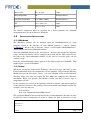
Introduction This document documents the procedure for creating and compiling an Orocos Component using Simulink/RealTime Workshop from The MathWorks. 1.1 WORKFLOW OVERVIEW The following figure shows how the Simulink and Orocos runtime work together. In a mixed WindowsLinux environment, the Linux station exports its build environment as a shared folder using the SAMBA software to the Windows client. The Windows client opens this folder and creates or edits the models using Simulink. When ready, the RealTime Workshop is used to generate the code, which is put in the shared folder and compiled into an Orocos component in the Linux environment. Alternatively, you can develop the model in Windows and use a USB stick to transfer the generated code to a Linux station. When the Simulink software runs in a Linux environment as well, the generated code will be compiled automatically by the RealTime workshop into an Orocos component. 1.2 SOFTWARE VERSIONS The following software versions are required to follow the steps in this document: Software Supported Versions Notes Orocos RTT 1.2.x or later Linux Document: Status/Version: File Location: Page 2 of 9 FMTC