1
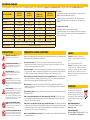
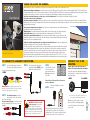
EXTENSION CABLES:
For more information on which cable to use for your application, please see the extended chart at www.q-see.com/cableselection To purchase, order online at www.Q-SeeStore.com
Q-See Model Number
Maximum Run Length
QS60F (60’)
QS120F (120’)
QS50B (50’)
QS100B (100’)
QSVRG60 (60’)
QSVRG100 (100’)
QSVRG200 (200’)
QS59500 (500’)
QS591000 (1000’)
180’
180’
800’
800’
Standard
Standard
High
High
75Ω Video Cable
75Ω Video Cable
RG-59
RG-59
Shielded
No
No
Yes - UL Rated
Yes - UL Rated
Plenum Rated
No
No
No
No
Video
RCA
BNC
BNC
BNC
Audio
RCA
N/A
N/A
N/A
Power
2.1mm
2.1mm
2.1mm
2.1mm
Quality Output
Type
Pre-Attached Connector
Usage
Indoor/Outdoor · Do not run inside walls or underground
Camera Compatibility
PRECAUTIONS:
CAUTION! Risk of electrical shock. To prevent
electric shock, do not remove screws or cover.
Do not attempt to disassemble camera. There are
no user serviceable parts inside. Service should be
performed by a qualified Q-See technician only.
Handle camera with care. Do not hit, shake,
puncture or drop the camera as this could cause
damage and prevent proper operation.
Avoid strong light. Do not aim camera at sun or
aim strong light directly into the lens as it will degrade
image quality and could cause damage. Camera should
ideally be placed out of direct sunlight for improved
performance.
Protect from elements. Indoor/outdoor cameras are
weatherproof but direct exposure to excessive rain, sun
or marine environmental conditions will degrade their
performance and shorten the life of the product.
Indoor-only cameras should NEVER be used outdoors.
Even if sheltered from direct exposure, they will still be
damaged by dust and moisture in the air.
Avoid excessive moisture within camera or
adapters. Do not use strong or abrasive detergents
when cleaning camera body. Clean with dry cloth or
mild detergent, wiping gently.
Do not use camera beyond prescribed voltage range.
Only use included power supply. Ensure power input
source conforms to local voltage. Voltage outside of
range could cause damage or abnormal performance.
Other Notes:
· If a cable run exceeds 800ft, we recommend using RG-6 coaxial cable which is
available at most retail building supply companies.
·If your home or business is pre-wired with CAT-5 cable, then you can run up
to 1000ft. (QSBAL2 Video Balun or Powered Balun are recommended for easy
installation.
To maintain video quality:
· Video quality is always enhanced by using shielded cables.
· To prevent video signal loss, run one continuous cable between the camera and
DVR for best results. If more length is required, use the minimum number of interconnection points possible.
Indoor/Outdoor · In-wall or along wall
CMOS/CCD, RCA/BNC Connection
FREQUENTLY ASKED QUESTIONS:
Below are some frequently asked questions regarding cameras. Additional information, plus live chat (during regular
business hours) can be found at www.Q-See.com/Support
Lines in the video images. Check the cable. If you connect a camera that is working to the cable of the
camera that has the lines and it too shows lines, replace the cable. If you are in an area with a lot of electrical
interference, switch to a shielded cable such as RG-59.
No video from camera. Check all connections and make sure that camera is connected to proper power supply.
Check to see that the camera is receiving power by cupping hand over lens. You should see a faint red glow from
the LEDs. Check camera on known functioning cable to determine if issue lies with camera or cable.
Cable extended to more than 60 feet and no video or video only during the day. The camera power supply/
power splitter combination is only designed to power cameras up to 60 feet. Any cameras beyond that distance
will need their own power supply which is available at www.Q-SeeStore.com
Dark video image. Some cameras feature an infrared cut filter to improve daytime video images. This can
sometimes become stuck. Place a hand over the lens for 10 seconds to trigger night vision mode. You may hear a
soft click as the filter resets.
Upside down video image. Change the orientation or position of your camera to correct. Video images cannot be
flipped within the DVR.
Camera looking through window has video image during day, but not at night. The LEDs on the camera
act as a flashlight and, at night, this light is being reflected by the window back at the camera. You will need to
reposition the camera outside the window.
Camera video is very dark during one time of day, but lighter during others. The camera may be positioned
so that the sun shines directly into it. This will backlight the subjects in the camera’s field of view and cause them
to appear dark and washed out. Reposition the camera to avoid this, keeping in mind that the sun will change
positions over the course of a year as well as during the day.
Camera on metal building has excessive static. The camera will need to be seperated from the metal building
by using a rubber gasket.
LEGAL:
Trademarks: All brand names and products are
trademarks or registered trademarks of their respective
owners.
Q-See is a registered trademark of DPS, Inc.
Disclaimer: The information in this document is subject
to change without notice. The manufacturer makes no
representations or warranties, either express or implied, of
any kind with respect to completeness of its contents.
Manufacture shall not be liable for any damages whatsoever
from misuse of this product.
DISPOSAL:
If the camera no longer functions or can no
longer be repaired, it must be disposed of
according to regulations regarding electronic
waste. By not disposing of electronic items in
household waste you will not only be following
the law, but contributing to the protection of the
environment.
Digital Peripheral Solutions, Inc.
8015 E. Crystal Dr., Anaheim, CA 92807
www.q-see.com
Q-See Customer Support (USA)
FAQ, videos, guides 24/7 & live chat (M-F 9-5pm
PST) at www.Q-See.com/Support