1
Contents
Contents
1
2
3
4
4.1
4.2
4.3
4.4
5
5.1
5.2
6
Introduction
Getting Started
Overview
Your WP-210E XGA Line Driver
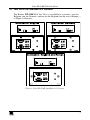
Your WP-210E: Available in 3 Versions
Your WP-210E Front Panel
Your WP-210E Lower Side Panel
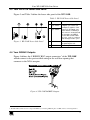
Your RGBHV Outputs
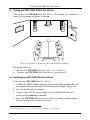
Using the WP-210E XGA Line Driver
Installing the WP-210E XGA Line Driver
Operating the WP-210E XGA Line Driver
Technical Specifications
1
1
1
2
3
4
5
5
6
6
7
9
Figures
Figure 1: Your WP-210E: Available in 3 Versions
Figure 2: WP-210E Front Panel
Figure 3: WP-210E Lower Side Panel
Figure 4: WP-210E RGBHV Outputs
Figure 5: Example of Conference Room WP-210E Installation
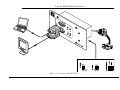
Figure 6: Connecting the WP-210E
3
4
5
5
6
8
Tables
Table 1: WP-210E Front Panel Features
Table 2: WP-210E Lower Side Panel
Table 3: Technical Specifications of the WP-210E XGA Line Driver
4
5
9
i