1
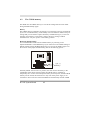
Plug and Play Interrupts
Because of the interrupts under the ISA specification being fixed by hardware, many
conflict situations occurred. To solve this problem the PnP (Plug and Play) specification
was developed. PnP devices tell the BIOS what system resources they require, and the
BIOS assigns system resources in a way that avoids conflict situations.
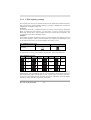
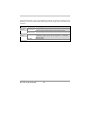
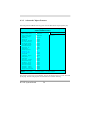
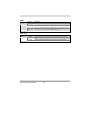
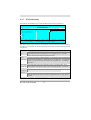
The PnP BIOS can only assign interrupts that are NOT used by legacy ISA devices (See the
table above). The set of interrupts that is available to the PnP BIOS for assignment to PnP
devices is called the PnP Interrupt pool.
PnP PCI Devices can be assigned whatever IRQ is available from the PnP Interrupt pool,
but PnP ISA devices provide the PnP BIOS with a list of what IRQs can be assigned to it,
the PnP BIOS will then assign an IRQ from the PnP Interrupt pool from that list.
Of the interrupts assigned to legacy ISA devices, some can be made available (released) to
the PnP Interrupt pool. Some Legacy device interrupts can by definition not be released.
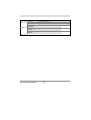
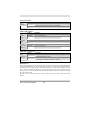
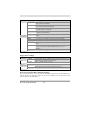
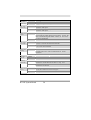
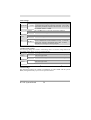
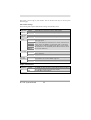
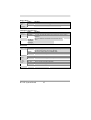
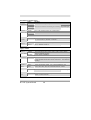
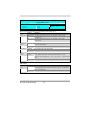
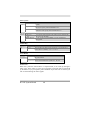
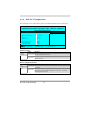
The following table explains how to free legacy ISA interrupts for use by the PnP Interrupt
pool.
Interru
pt line
IRQ 0
IRQ 1
IRQ 2
IRQ 3
How to set the BIOS to release the IRQ to the PnP interrupt pool
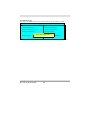
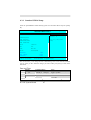
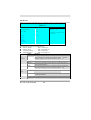
PnP / PCI Configuration page Integrated Peripherals
Fixed, not available
Fixed, not available
Fixed, not available
IRQ 3: PCI / ISA PnP
Onboard Serial Port 2: disabled
Note: If set to Auto, IRQ3 will be released only if COM2 has no device attached to it.
IRQ 4
IRQ 4: PCI / ISA PnP
Onboard Serial Port 1: disabled
Note: If set to Auto, IRQ4 will be released only if COM1 has no device attached to it.
IRQ 6
IRQ 7
IRQ 8
IRQ 12
Fixed, not available
IRQ 7: PCI / ISA PnP
Fixed, not available
IRQ 12: PCI / ISA PnP
Onboard Parallel Port: disabled
IRQ 12 will be released automatically if no PS/2
mouse is used.
IRQ 13 Fixed, not available
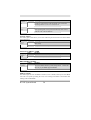
IRQ 14 IRQ 14: PCI / ISA PnP
On-chip IDE channel 0: Disabled
IRQ 15 IRQ 15: PCI / ISA PnP
On-chip IDE channel 1: Disabled
Note: IRQs not mentioned (5, 9, 10, 11) are always availabe to the PnP interrupt pool.
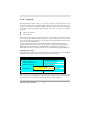
If you use an ISA Card that does not support PnP (an ISA legacy card), the interrupt used
by the card must be set to Legacy ISA instead of PCI / ISA PnP in the BIOS. This will
make sure that the interrupt used by the ISA card is not included in the PnP interrupt pool.
K7VAT System Board
25