1
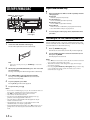
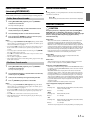
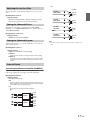
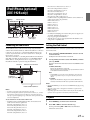
Adjusting Volume Radio Turn the Rotary encoder until the desired sound is obtained. SOURCE/ Rotary encoder /ENTER Controllable with Remote Control This unit can be controlled with an optional Alpine remote control. For details, consult your Alpine dealer. Point the optional remote control transmitter at the remote-control sensor. Remote control sensor BAND TUNE/A.ME Connectable to Remote Control Interface Box With an optional Alpine Steering Wheel Remote Control Interface Box (not included), this unit is controllable from the vehicles steering wheel controls. For details, contact your Alpine dealer. Preset buttons (1 through 6) Listening to Radio 1 2 Press SOURCE to select TUNER mode. Press BAND repeatedly until the desired radio band is displayed. F1 (FM1) F2 (FM2) F3 (FM3) MW LW F1 (FM1) 3 Press TUNEA.ME to select the tuning mode. SEEK DX (Distance mode) SEEK LOCAL (Local mode) MANUAL (Manual mode) SEEK DX Distance mode (Initial setting): Both strong and weak stations will be automatically tuned in (Automatic Seek Tuning). The “ ” indicator lights up. Local mode: Only strong stations will be automatically tuned in (Automatic Seek Tuning). Manual mode: The frequency is manually tuned in steps (Manual tuning). 4 Press or to tune in the desired station. In Manual mode, holding down or will change the frequency continuously. Presetting Stations Manually 1 2 Select the radio band and tune in a desired radio station you wish to store in the preset memory. Press and hold for at least 2 seconds, any one of the preset buttons (1 through 6) into which you wish to store the station. The selected station is stored. The display shows the band, preset number and station frequency memorized. Notes • A total of 30 stations can be stored in the preset memory (6 stations for each band; FM1, FM2, FM3, MW and LW). • If you store a station in a preset memory which already has a station, the current station will be cleared and replaced with the new station. 9-EN