1
 Lesson: 8/19
Lockout/Tagout Safeguards
From time to time, almost every robot will need some form of maintenance or repair
that requires a worker to remove guards and enter the robot's work envelope.
However, if proper lockout/tagout procedures are followed, much of the risk can be
avoided.
Lockout/tagout is the common term for a set of safety practices that protect
employees by preventing accidental machine startup. OSHA has specific requirements
for lockout/tagout procedures. According to these guidelines, machines undergoing
maintenance must be disconnected from their power sources. Locks and warning tags
must be placed on switches to prevent them from being turned on.
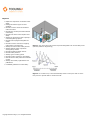
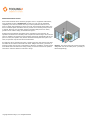
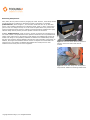
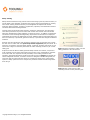
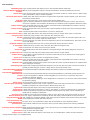
A lockout device is made to hold a switch in a safe or "off" position, or to cover the
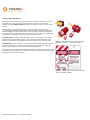
switch so that it is inaccessible. Figure 1 shows examples of lockable switch covers.
Normally, lockout devices are designed so that they require a key to remove them.
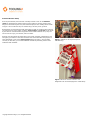
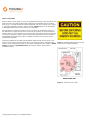
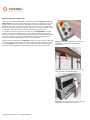
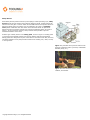
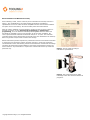
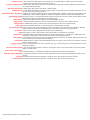
Tagout devices, shown in Figure 2, are prominent warning labels that alert workers to
the fact that machinery or equipment is undergoing service and should remain off.
When a lockout device is in use, it must also have a tag attached.
Figure 1. These mechanisms allow the electrical
switch to be locked out. (Courtesy of NMC.)
Only the person who initiates a lockout/tagout procedure is allowed to remove the locks
and warning devices and restart the machine. However, before production begins again,
all guards should be put back in place.
Figure 2. Tagout devices are prominent warning
devices. (Courtesy of NMC.)
Lesson: 9/19
Emergency Stops and Safety Trips
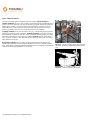
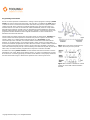
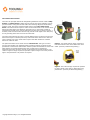
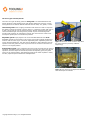
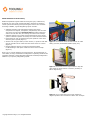
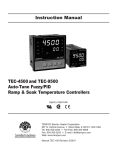
One of the most common safeguards in manufacturing is the emergency stop or Estop switch. An emergency stop switch brings a machine to a rapid stop in a manner
that prevents harm by the equipment. Mechanical or electrical brakes are generally
engaged on the robot’s drives when an E-stop is pressed. The E-stop can take the
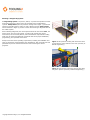
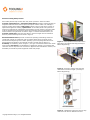
form of a push button, as shown in Figure 1, trip wire, or pull rope, as shown in Figure
2. Emergency stop switches should be easy to identify and easy to reach.
For a robot, the emergency stop can be located on the teach pendant. The teach
pendant generally has complete control over the robot. When entering the robot's
work area, an operator or technician should have physical control of the teach pendant
at all times. The teach pendant can stop anyone from starting the robot from the
control
panel
viaTooling
the teach
pendant
E-stop
or other mechanisms.
Copyright
© 2009
U, LLC.
All Rights
Reserved.
Another common safeguard is the safety trip. Unlike an emergency stop, a safety trip
is a passive means of deactivating a machine. If someone presses against a pressure-
Figure 1. An E-stop switch brings a robot to an