1
PWS6800 Operation
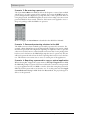
Scenario 2: Re-entering a password
The object Action Button in ADP also allows the designer to create a button which
asks the user to re-enter a password. For example, by pressing the PSW-button the
password keypad will be displayed to prompt the user to enter a password. After entering the password, the HMI will update the user level according to the most recent
password which has been entered. Therefore, this button can be applied to raise or
drop one’s privileges while the HMI is in operation.
How to configure an Action Button is described in the ADP User’s Manual.
Scenario 3: Password-protecting a button in the HMI
The ADP can create a button which is protected by a password for execution. For
example, a Goto Screen button can be designed with a high level of security; which
means that a password with a high level of privilege is required in order to open the
other screen. As the button is selected and the current user has a lower privilege than
has been set for the button, the HMI will prompt the user for a password. The user
will need a password with at least the level of privilege that has been set for the button. This function can restrict users to access to certain parts of the application.
Scenario 4: Requiring a password to copy or upload application
When selecting F3 - Copy in the system menu or File/Upload Application in ADP,
the HMI will prompt for a password. The user will need to enter the correct password
to copy an application from one HMI to another. Note that setting this password is
different from the passwords set in Scenarios 1-3. To set this password, select Application/Workstation Setup in ADP. Under the Password tab, the project designer is
able to set the password.
15
Beijer Electronics, MAEN850