1
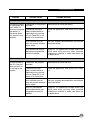
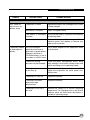
Problem
Possible Cause
Possible Solution
Power Failures
You turn on your
Tablet PC and
nothing seems to
happen.
The installed battery is
completely discharged or
there is no power adapter
installed.
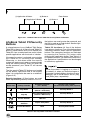
Check the Status Indicator Panel to determine
the presence and condition of the battery. Install
a charged battery or a Power adapter.
The battery is installed but Use the Status Indicator Panel to verify the
presence and condition of the battery. If a battery
is faulty.
is indicating a short, remove that battery and
operate from another power source or replace
that battery.
The battery is low.
Check the Status Indicator Panel to determine
the presence and condition of the battery. Use a
Power adapter until the battery is charged.
The AC or auto/airline
adapter is not plugged in
properly.
Verify that your adapter is connected correctly.
The Power adapter has no Move the AC cord to a different outlet, check
power from the AC outlet, for a line switch or tripped circuit breaker for the
AC outlet.
airplane seat jack, or the
car’s cigarette lighter.
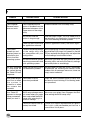
Your Tablet PC
turns off all by
itself.
76
The Power adapter is
faulty.
Try a different Power adapter or install a charged
optional second battery.
The power management
parameters are set for
auto timeouts which
are too short for your
operating needs.
Press any button on the keyboard, or move the
mouse to restore operation. If that fails, push
the Suspend/Resume button. Check your power
management settings, or close your applications
and go to the Power Savings menu of the setup
utility to adjust the timeout values to better suit
your operation needs.
You are operating on battery
power only and have ignored
a low battery alarm until the
battery is at the dead battery
state and your machine
has gone into Dead Battery
Suspend mode.
Install a power adapter and then push the
Suspend/Resume button.
You have a battery failure.
Verify the condition of the battery using the
Status Indicator panel, and replace or remove
any battery that is shorted.
Your power adapter has
failed or lost its power
source.
Make sure the adapter is plugged in and the
outlet has power.