1
TABLE OF CONTENTS
Introduction...................................................................................................................................................................... 1
Materials .......................................................................................................................................................................... 2
Features and Functions................................................................................................................................................... 3
Limitations ....................................................................................................................................................................... 4
Preparation for Installation .............................................................................................................................................. 4
Installation ....................................................................................................................................................................... 5
Installing The Local Unit .............................................................................................................................................. 5
Units with 2-Way Audio and RS232 Support............................................................................................................ 6
Connect Local Monitor(s).......................................................................................................................................... 6
Installing the Remote Unit............................................................................................................................................ 7
Connect The CATx Cable............................................................................................................................................ 8
Plug-in and Boot Up..................................................................................................................................................... 8
DDC................................................................................................................................................................................. 9
Video Quality Adjustment ................................................................................................................................................ 9
Interconnection Cable Wiring Method ........................................................................................................................... 10
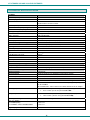
Technical Specifications................................................................................................................................................ 11
Troubleshooting............................................................................................................................................................. 12
Warranty Information..................................................................................................................................................... 13
TABLE OF FIGURES
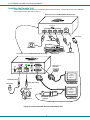
Figure 1- Connect video and device cables to the Local Unit ............................................................................................................ 5
Figure 2- Connect audio and RS232 cables to the Local Unit ........................................................................................................... 6
Figure 3-Connect local monitors ........................................................................................................................................................ 6
Figure 4- Connect extended devices to the Remote Unit................................................................................................................... 7
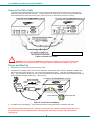
Figure 5- Connect CATx cables......................................................................................................................................................... 8
Figure 6- Connect the AC adapter(s) ................................................................................................................................................. 8
Figure 7- Turn "VIDEO ADJUST" screw for video quality adjustment................................................................................................ 9
Figure 8- View looking into RJ45 female.......................................................................................................................................... 10
ii