1
Quick Start Guide
Quick Start Implementation Guide
Integration of the 3100/3150-MDA-4 module into a PLC/SLC application is easier if a series of steps are followed.
In order to assist the first time users of our products in getting operational quickly, we have come up with this stepby-step implementation guide.
First Time Users
Although the following steps are to assist you in implementing the module, we
recommend that you attempt to experiment with the example logic provided on
disk with the module or available off our FTP site before laying out your
application. This step will allow you to gain insight into how the module works
prior to making decisions that will impact the long term success of the
installation.
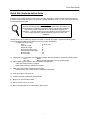
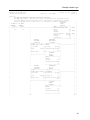
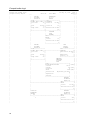
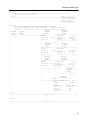
Starting with one of the ladder logic programs provided on disk with the module, complete the following steps:
If hand entering the ladder logic by hand for the SLC, remember the following:
Configure the slot as follows:
Other
ID Code xxxxx
Input File Length
8
Output File Length
8
Scanned Input File Length
8
Scanned Output File Length
8
M0 File Length
64
M1 File Length
64
a)
b)
Starting with one of the ladder logic programs provided on disk with the MDA-4 complete the following steps:
PLC 5
MDA4
SLC 5/03
MDA4_503 (See Appendix for SLC programming tips)
Edit the ladder logic provided on disk as needed for the application
Verify rack and slot location in program
Modify ladder instruction addresses as needed
c)
Setup the Communication Configuration parameters
Determine each port’s communication configuration requirements
d)
Setup the Polling List for each port
e)
Identify the jumper requirements (See Appendix)
f)
Make up the communication cables
g)
Place processor into the run mode
h)
Monitor the data table for the Data and Error Status values
i