1
Everything between the braces ({ and }) is interpreted just as usual, then stored
as the value associated with the name preceeding the braces.
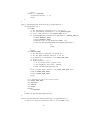
Naturally, you can create lists of property sets:
point = { x = 12; y = 10; };
point = { x = -12; y = 2; };
point = { x = 5; y = -39; };
In this case, lists created with the comma syntax are usually hard to read:
point = { x = 12; y = 10; }, { x = -12; y = 2; },
{ x = 5; y = -39; };
Finally, you can merge two property sets with a plus sign (+):
point = { x = 12; } + { y = 10; };
This is only really useful when at least one of the sets is a variable (see below).
6.1.5
Variables
Consider the following example: You want to create a list of a large number of
property sets that look like this:
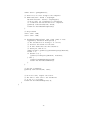
person = {
name = "John Doe";
position = {
x = 24.6;
y = 15;
};
type = soldier;
subtype = "cannon fodder";
weapon = knife, rifle, crossbow, "light sabre";
clothes = boots, pants, jacket, "fancy hat", underwear;
health = {
head = 100%;
left_arm = 100%;
right_arm = 100%;
left_leg = 100%;
right_leg = 100%;
torso = 100%;
};
};
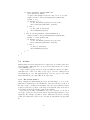
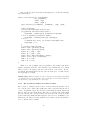
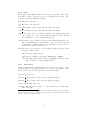
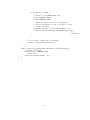
Only the name and position is different. To avoid typing the same information
over and over again, you can declare a variable with all the invariant things, like
this:
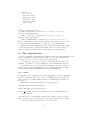
$person_defaults = {
type = soldier;
subtype = "cannon fodder";
weapon = knife, rifle, crossbow, "light sabre";
clothes = boots, pants, jacket, "fancy hat", underwear;
20