1
Small Vision System User Manual
2.4.3
24
Calibration
For good stereo processing, the two images must be aligned correctly with respect to each other. The
process of aligning images is called calibration. Generally speaking, there are two parts to calibration:
internal calibration, dealing with the properties of the individual cameras and especially lens distortion;
and external calibration, the spatial relationship of the cameras to each other. Both internal and external
calibration are performed by an automatic calibration procedure described in Section 4. The procedure
needs to be performed when lenses are changed, or the cameras are moved with respect to each other.
From the internal and external parameters, the calibration procedure computes an image warp for
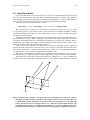
rectifying the left and right images. In stereo rectification, the images are effectively rotated about their
centers of projection to establish the ideal stereo setup: two cameras with parallel optical axes and
horizontal epipolar lines (see Fig. 2-2). Having the epipolar lines horizontal is crucial for correspondence
finding in stereo, as stereo looks for matches along horizontal scanlines.
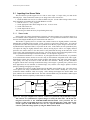
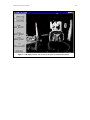
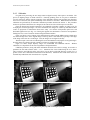
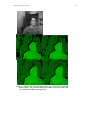
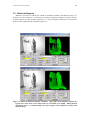
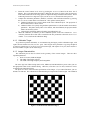
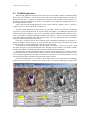
Figure 2-8 shows a pair of images of the calibration target taken with the MEGA-D stereo head and a
4.8 mm wide-angle lens. In the original images on the top, there is lens distortion, especially at the edges
of the image: notice the curve in the target. Also, the images are not aligned vertically.
The bottom pair is the result of calibrating the stereo head and then rectifying the two original images.
Now the images are aligned vertically, and all scene lines are straight in the images.
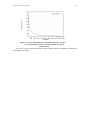
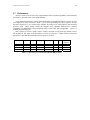
Figure 2-9 shows sample disparity images for uncalibrated and calibrated cameras. Without
calibration, it is impossible for the stereo algorithms to find good matches.
Calibration parameters, along with other information about the stereo device settings, are stored in a
parameter file that ends with the suffix “.ini”. Parameter files can be loaded using the File menu.
They can also be stored directly on the stereo device, for any device with a FW firmware version of 2.1 or
greater (see the device manuals for information on the firmware). Parameter files stored on the device are
automatically loaded into SVS when the device is opened.
Figure 2-8 Original stereo pair (top) and rectified pair (bottom).