1
ANALOG AV CONNECTIONS
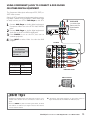
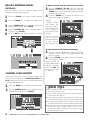
USING THE ANALOG VIDEO1 JACKS
TO CONNECT A VCR (OR OTHER
ANALOG DEVICE)
Switch off DTV and external equipment before connecting cables. (Cables are not supplied.)
1
BACK VIEW
OF VCR
Connect VCR’s Audio Video Out to the DTV’s
VIDEO1 jacks.
2
NOTE: For Mono VCR (Single Audio Jack), connect VCR
Audio Out to DTV Audio (L) Input.
2
S-VIDEO
JACK
Optional
Connect VCR’s S-Video Out to the HDTV's S-Video
In Jack.
1
NOTE: S-Video jack connections override VIDEO1 Video
jack connection.
3
4
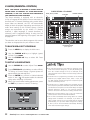
Press POWER to turn on the DTV, then turn on
external equipment.
Press INPUT to select Video 1 to
view the VCR program.
DTV AV
INPUT
JACKS
Video 1
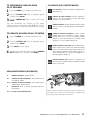
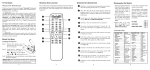
REMOTE CONTROL
What you will need for connections:
Audio Video Cable – 1
S-Video Cable – 1
INPUT
POWER
4
1
2
3
4
5
6
3
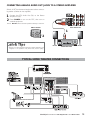
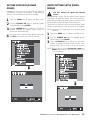
Press the INPUT key after connecting cables to access the
Video 1 input. There is NO need to tune to a blank channel.
“No Signal” will appear randomly on the screen when no
signal is detected at the VIDEO1 video jack.
14
Need help? Visit our Web site at www.sanyoctv.com or Call 1-800-877-5032
NOTES: Don’t be fooled by the phrase
“Available in High-Definition.”
Composite jacks offer only 480i
(SDTV) resolution.
To view available High-Definition
(HD) programs, you must connect
your HD equipment to the Component or HDMI jacks.