1
•
FM radio
With the radio, you can search for radio channels, listen to them, and save
them on your device. Note that the quality of the radio broadcast depends on the
coverage of the radio station in that particular area. In the FM radio interface, you
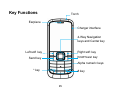
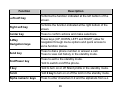
can press the Up/Down Navigation keys to adjust volume, press the
Left/Right Navigation keys to tune the frequency. When you receive an
incoming call while listening to the radio, the radio will be paused. Select
Options to enter the submenu.
Note: The wired headset works as an antenna, so always connect the headset
when using the radio.
•
File manager
You can check all the folders in the phone or memory card, create new ones,
rename, delete or sort, etc. The files you download from the internet will be stored
in these folders.
Note: When you select Format, the data will be lost, so please be careful with
this function.
44