1
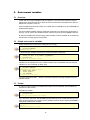
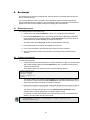
7. Boot commands 7.1 Overview U-Boot runs code placed in RAM, although it can also read data from other media. The boot process normally takes place in two steps: 7.2 7.2.1 Reading the OS image from media (Ethernet, flash, USB, MMC) into RAM Jumping to the first instruction of the image in RAM Reading images into RAM From Ethernet The most common way to boot an image during development is by transferring it using TFTP over the Ethernet interface. You do this with the tftpboot command, passing: The address of RAM in which to place the image The image file name # tftpboot <loadAddress> <bootfilename> The TFTP transfer takes place between the serverip address (host) and the ipaddr address (target). The host must be running a TFTP server and have bootfilename archive placed in the TFTP-exposed directory. For Linux kernel images, if the autostart variable is set to yes, this command directly boots the kernel after downloading it. 7.2.2 From USB Another way to boot an image is by reading it from a USB flash storage device. The USB disk must be formatted either in FAT, ext2, or ext3 file system. To read an image from a USB flash disk formatted in FAT, enter: # # usb reset fatload usb <dev>[:partition] <loadAddress> <bootfilename> If the flash disk is formatted in ext2/ext3: # # usb reset ext2load usb <dev>[:partition] <loadAddress> <bootfilename> This command reads file bootfilename from device dev, partition partition of the USB flash disk into the RAM address loadAddress. Device and partition are given as a number (0, 1, 2...). If no partition is specified, partition 1 is assumed. 7.2.3 From MMC If the target has an MMC or HSMMC (High Speed MMC) interface U-Boot can also read from it. The MMC card must be formatted either in FAT, ext2, or ext3 file system. 21