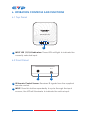
1
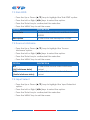
6.3 Left Panel
HDMI IN
USB 5V
1
2
1
2
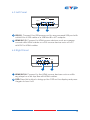
1 USB 5V: Connect the USB power port to any powered USB port with
a Mini-B to A USB cable or a USB Mini-B to AC adaptor.
2 HDMI IN 1/2: Connect to HDMI source devices such as a games
console with HDMI cables or a DVI source device such as a PC
with DVI to HDMI cables.
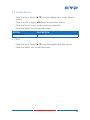
6.4 Right Panel
HDMI IN
3
4
1
OSD
2
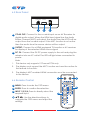
1 HDMI IN 3/4: Connect to the HDMI source devices such as a Bluray player or a Set-top Box with HDMI cables.
2 OSD: Press this button to bring up the OSD on the display and press
it again to turn it off.
4