1
note
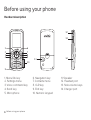
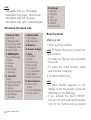
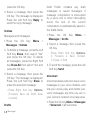
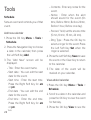
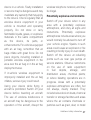
• Navigation Key up : Messages
• Navigation Key down : Multimedia
• Navigation Key left : Browser
• Navigation Key right : Games&Apps
Accessing the menu map
1. Recent Calls
1. All Calls
2. Missed Calls
3. Incoming Calls
4. Outgoing Calls
5. Call Timers
4. Multimedia
1. My Images
2. My Sounds
2. MESSAGES
1. Send Message
2. Inbox
3. Outbox
4. Drafts
5. Voicemail
6. Settings
7. Tools
1. Schedule
2. Alarm
3. World Time
4. Memo Pad
5. Calculator
6. Tip Calculator
7. Stop Watch
8. Unit Converter
3. Contacts
1. Find
2. Add New Entry
3. Speed Dials
4. Group
5. Service Number
6. My Phone
Number
10
Basic operation
9. Settings
1. Display
2. Sounds
3. Call
4. Security
5. Others
6. Phone Info
Basic functions
Making a call
5. Browser
1. Enter a phone number.
6. Games & Apps
note
8. Voice Service
1. Voice Command
2. V.Cmd Settings
3. Voice memo
To modify the phone number you
have entered :
• To erase one digit at a time press the
Clear Key.
• To erase the entire number, press
and hold the Clear Key.
2. Press the SEND Key.
note
• If “CALL FAILED” appears on the
display or the line is busy, press the
SEND Key or the END Key.
• If you activate the “AUTO RETRY”
function, the phone will automatically
retry for the number until you select