1
Dynamix DW-Phone LP-201 SIP IP Phone
Chapter 1 Overview of the Dynamix DW-Phone LP-201 ...................................................... 4
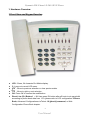
1. Hardware Overview .................................................................................................. 5
1.Front View and Keypad function ......................................................................... 5
2.Back View........................................................................................................... 9
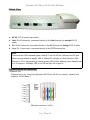
3.Specification of connector................................................................................... 9
2. Software Features and Specification ...................................................................... 11
3. Physical specification & Environment ..................................................................... 13
Chapter 2 Configuring the Dynamix DW-Phone LP-201 through LCD Phone menus ......... 14
1. Initialize Dynamix DW-Phone LP-201 .................................................................... 14
2. LCD Menu Configuration ........................................................................................ 16
Chapter 3 Configuring the Dynamix DW-Phone LP-201 through Web Pages .................... 22
Step 1. Browse the IP Address predefined via Keypad ............................................... 23
Step 2. Input the login name and password ................................................................ 24
Step 3. Enter the web interface main screen .............................................................. 25
Step 4. Start to configure ............................................................................................ 25
1. Network Interface ............................................................................................ 26
2. SIP Information ................................................................................................ 29
3. System Configuration ...................................................................................... 31
4. PPPoE Configure ............................................................................................ 32
5. Voice Setting.................................................................................................... 33
6. Phone Book ..................................................................................................... 34
7. DDNS Configuration ........................................................................................ 35
8. DSCP Configuration ........................................................................................ 36
9. Password......................................................................................................... 38
10. Rom Configuration......................................................................................... 39
11. Flash Clean.................................................................................................... 40
12. Reboot System .............................................................................................. 41
Chapter 4 Configuring the Dynamix DW-Phone LP-201 through Telnet command lines ..... 42
1. [help] command ...................................................................................................... 42
2. [quit] command ....................................................................................................... 43
3. [debug] command ................................................................................................... 43
4. [reboot] command................................................................................................... 43
5. [pbook] command ................................................................................................... 43
6. [commit] command ................................................................................................. 44
7. [ping] command ...................................................................................................... 44
8. [time] command ...................................................................................................... 45
9. [ifaddr] command .................................................................................................... 45
10. [pppoe] command ................................................................................................. 47
1
User Manual