1
Status section
The status section provides detailed information about what state
the Digital Timepiece is in as a synchronizer. The following
sections provide a brief explanation of each term.
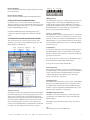
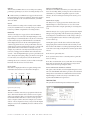
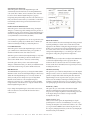
Figure 8: Frame Lock and other check box options.
If the Frame lock option is turned on (checked), and the Digital
Timepiece detects more than five frames in a row that are not
continuous with respect to previous frames received, then it will
stop converting altogether.
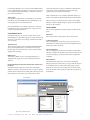
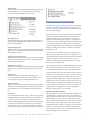
Figure 7: The Status section.
Output phase lock
When this status indicator is illuminated, it means that time code
generated by the Digital Timepiece (MTC and LTC) is in sync
with the current time base.
Input frame phase lock
When this status indicator is illuminated, it means that the Digital
Timepiece has successfully achieved lockup with incoming LTC/
MTC full frame messages.
Input quarter frame phase lock
When this status indicator is illuminated, it means that the Digital
Timepiece has successfully achieved lockup with incoming LTC/
MTC quarter frame messages.
External time code detect
When this status indicator is illuminated, it means that the Digital
Timepiece has successfully detected external time code (MTC,
LTC).
Framelocked
This status indicator means that the Digital Timepiece is
successfully locked to an external time base and that it is also
successfully generating or converting SMPTE time code.
Word clock stable
When this status indicator is illuminated, it means that the Digital
Timepiece has successfully achieved a stable time base rate from
its internal time base or by determining the external time base
rate.
Frame lock
To understand the Frame lock option, you first need to know that
the Digital Timepiece continuously monitors incoming time code
to detect any possible discontinuity in the frame times as they
advance. If the Digital Timepiece detects more than five frames in
a row that are not continuous with respect to previous frames
received, then it does one of two things, depending on whether
the Frame lock option is turned on (checked) or off (unchecked).
If the Frame lock option is turned off (unchecked), and the Digital
Timepiece detects more than five frames in a row that are not
continuous with respect to previous frames received, then it
begins to perform a kind of “pseudo jam sync”. In this mode, it
continues to convert an uninterrupted stream of continuous time
code, while at the same time clocking off of the incoming time
code. Even though the frames it is generating no longer match the
frames it is reading, it will continue to remain in sync with the
incoming time code.
In other words, when the Frame lock option is off, the Digital
Timepiece ignores discontinuous jumps in incoming time code
by continuing to clock itself off of the incoming time code without
stopping (or pausing). In doing so, it continues to convert a
continuous, uninterrupted stream of frame times based on the
time code to which it first locked.
Turn on Frame lock when you want the Digital Timepiece’s frame
times to match incoming frame times, and you want it to stop
converting altogether if there are jumps in incoming time code.
Turning off Frame lock can be a life saver if you find yourself in a
situation where you have time code on tape (or other source) but
the frame locations jump around to different times (because of
overlapping SMPTE striping, edits, or whatever). By turning off
Frame lock, you can sync continuously to this type of time code
without glitching or stopping. If the SMPTE on your tape jumps
around as described, you are likely to experience brief drop-outs
at the points where it jumps. If so, just increase the Digital
Timepiece’s freewheeling to cruise past them.
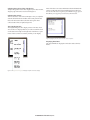
Generate signal when stopped
This option applies to situations in which the Digital Timepiece is
converting time code and the source time code continues even
when it is parked on a frame. The most common case is when the
Digital Timepiece is locked to VITC and generating time code
while still-framed, and the video deck is paused. In this situation,
the Generate signal when stopped option, when checked, makes
the Digital Timepiece continue to output time code (LTC, MTC
and VITC), even while the video is parked on a single frame in
pause mode. It will continue to do so as long as the video head is
engaged and VITC lines can be scanned.
USING CLOCKWORKS FOR MAC OS X WITH THE MIDI TIMEPIECE AV
7